> ## Documentation Index
> Fetch the complete documentation index at: https://docs.fynn.eu/llms.txt
> Use this file to discover all available pages before exploring further.
# Units
> Create and manage your units
Units are measurement units used to quantify products and services.
They can take various forms, such as pieces, kilograms, liters, hours, etc.
Units allow you to precisely define the price and quantity of a product or service.
## Using Units
Units are used in Fynn for the following purposes:
* Billable Units: Units are referenced in billable units to quantify the amount used for billing. For example, if you offer a service that is billed per hour, you can use the unit `Hour` to quantify the number of hours used for billing.
* Billing and Invoicing: Units are also used in [manual invoicing](/guide/billing/invoices#manuelle-rechnung-erstellen) to quantify the items on the invoice.
## Difference between Units and Billable Units
Units and billable units are two different concepts in Fynn.
Units cannot be used directly for recurring billing. They are only used as a reference for the quantity that is billed in billable units.
This means a [price](/guide/catalogue/prices) is always defined with a billable unit, not with units.
Solltest du hier Unklarheiten haben, zögere nicht, uns zu kontaktieren: [Termin buchen](https://cal.com/team/fynn/fynn-documentation)
## Create a Unit
Units can be created wherever a corresponding dropdown is available.
For example, in the ["New Billable Unit" form](/guide/catalogue/measurements/introduction#neue-abrechenbare-einheit-erstellen).
Or in the ["Create Invoice" form](/guide/billing/invoices#manuelle-rechnung-erstellen).
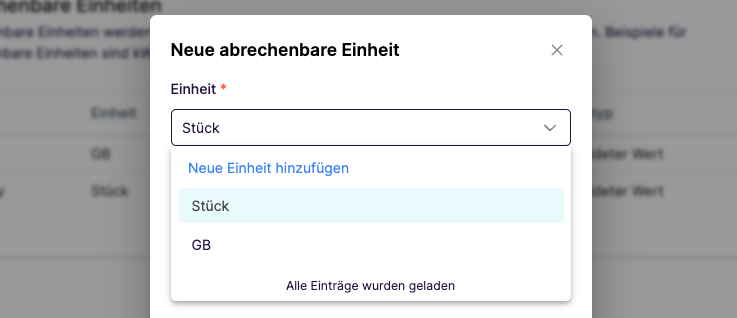 Now click on "Create New Unit" and enter the name of the unit.
 Click on the "Check" icon to save the unit. You can now select the unit from the dropdown list.
Use the [Create Unit](/api-reference/unit/create-a-unit) endpoint for this.
```bash theme={null}
POST /units
```
Alternatively, you can [retrieve the unit](/api-reference/unit/get-a-unit)
or [update the unit via the API](/api-reference/unit/update-a-unit).
Mehrsprachigkeit
Click on the "Check" icon to save the unit. You can now select the unit from the dropdown list.
Use the [Create Unit](/api-reference/unit/create-a-unit) endpoint for this.
```bash theme={null}
POST /units
```
Alternatively, you can [retrieve the unit](/api-reference/unit/get-a-unit)
or [update the unit via the API](/api-reference/unit/update-a-unit).
Mehrsprachigkeit
Aktuell kann hierfür nur über die API eine weitere Übersetzung in einer anderen Sprache hinzugefügt werden.
Die korrekte Übersetzung erfolgt dann auf der Sprache des Kunden. Sollte die Übersetzung nicht in der entsprechenden Sprache
verfügbar sein, wird standardmäßig die deutsche Übersetzung verwendet.
## Edit Unit
A unit cannot be edited via the web app. However, you can [update the unit via the API](/api-reference/unit/update-a-unit).
## Delete Unit
A unit cannot currently be deleted.