> ## Documentation Index
> Fetch the complete documentation index at: https://docs.fynn.eu/llms.txt
> Use this file to discover all available pages before exploring further.
# Customer Settings
> Configure individual settings per customer
## Overview
Customer settings allow you to configure specific settings for each customer.
By default, these settings are inherited from the organization.
You can identify where the settings are inherited from by the inheritance hint:
* **Inherited from Organization**: The setting is inherited from organization settings
* **Inherited from Default Values**: The setting uses the system default
* **Customer-specific Value**: The setting has been set individually for this customer
Once a setting has been set individually for a customer, it can no longer be automatically inherited from the organization.
## Open Settings
Navigate to "Customers" and select the desired customer.
Click on the "Settings" tab in the customer detail view.
## Electronic Invoice
Configure whether and in which format the customer should receive electronic invoices.
All settings and details about electronic invoicing can be found under [e-Invoice](/en/guide/invoices/e-invoicing).
## Adjust Payment Term
The payment term is set to 14 days by default and is inherited from the organization. You can adjust the payment term individually for the customer.
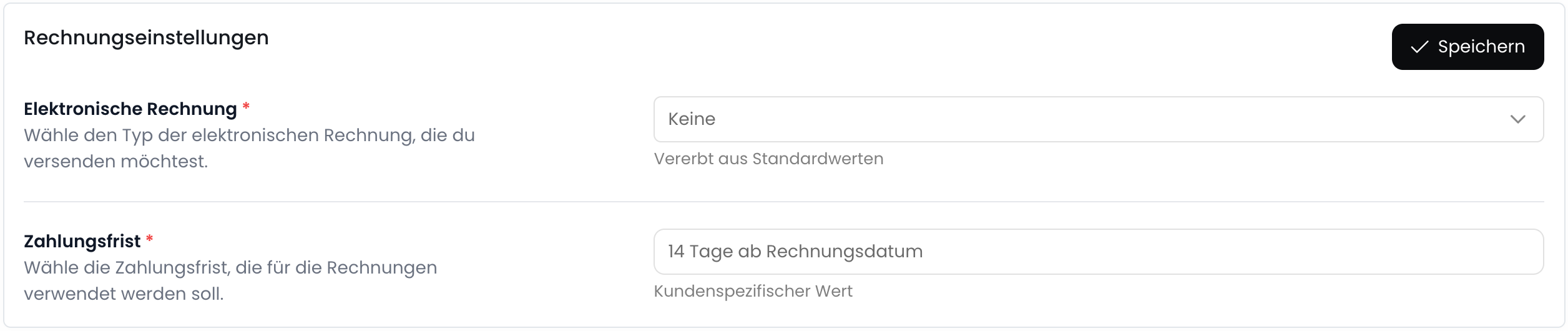 The payment term applies to all new invoices for this customer. Existing invoices are not changed.
## Auto-send Documents
Disable this option to not automatically release invoices from a subscription.
This allows you to review and adjust the invoice before sending.
The payment term applies to all new invoices for this customer. Existing invoices are not changed.
## Auto-send Documents
Disable this option to not automatically release invoices from a subscription.
This allows you to review and adjust the invoice before sending.
 If this option is disabled, you must manually finalize and send invoices.
## Disable Payment Reminders
Disable this option to not send payment reminders for the customer.
This disables both payment reminders and dunning notices for the customer.
If this option is disabled, you must manually finalize and send invoices.
## Disable Payment Reminders
Disable this option to not send payment reminders for the customer.
This disables both payment reminders and dunning notices for the customer.
 This setting only affects automatic payment reminders. Manual reminders can still be sent.
## Disable Dunning Fees
Disable this option to not charge dunning fees for the customer.
This setting only affects automatic payment reminders. Manual reminders can still be sent.
## Disable Dunning Fees
Disable this option to not charge dunning fees for the customer.
 ## API
You can also retrieve and change customer settings via the API:
```bash theme={null}
GET /customers/{customerId}/settings
```
[API Documentation](/api-reference/customersettings/get-settings)
```bash theme={null}
PUT /customers/{customerId}/settings
```
[API Documentation](/api-reference/customersettings/update-settings)
## API
You can also retrieve and change customer settings via the API:
```bash theme={null}
GET /customers/{customerId}/settings
```
[API Documentation](/api-reference/customersettings/get-settings)
```bash theme={null}
PUT /customers/{customerId}/settings
```
[API Documentation](/api-reference/customersettings/update-settings)