> ## Documentation Index
> Fetch the complete documentation index at: https://docs.fynn.eu/llms.txt
> Use this file to discover all available pages before exploring further.
# Fynn Functions
> With Fynn Functions, you can customize the behavior within Fynn.
Fynn Functions allows developers to extend the behavior of backend logic.
Here you will learn how to set up and use Fynn Functions.
This extension is currently in a closed beta phase. Please contact us to get access.
## How does Fynn Functions work?
Fynn Functions allows you to write custom functions that respond to events in Fynn.
For this, we provide various [extension points](#extension-points) that you can use to write custom logic.
If one or more functions are registered for an extension point, they are executed when the corresponding event occurs.
A context object is passed that contains information about the event, which could be a cart, for example.
Within the function, you can then perform any actions, such as calling an external API.
Each function must return one or more predefined [operations](#operations) at the end, which are then executed by Fynn.
Each extension point has different context objects and operations that you can use.
## Runtimes
Each function is executed in an isolated environment limited to 5 seconds. Please note that the runtime of a function directly affects Fynn's response time.
## Functionality in Fynn Functions
Within Fynn Functions, you can use all JavaScript functions that are also available in the browser.
## Extension Points
Fynn Functions currently supports the following extension points:
* [Checkout](#checkout): `checkout.cart.delivery`, `checkout.cart.cart_item_option`
### Add Shipping Costs
The `checkout.cart.delivery` extension point can be used to add shipping costs to the cart.
If the price of the shipping costs is one-time, it is only calculated in the 1st invoice and is not recurring.
Otherwise, the price of the shipping costs is calculated in every invoice.
#### Context Object
The current cart of the user
The country code of the delivery country, taking into account the billing and delivery address of the cart.
#### Operations
The product ID to be added as shipping costs.
The price plan to be used for the shipping costs. If none is specified, the 1st price in the product is used.
#### Example
```typescript theme={null}
function run (input) {
const countryCode = input?.deliveryCountryCode;
const itemsCount = input?.cart?.items.length;
if (itemsCount === 0) return [];
if (countryCode === 'DE') {
return [{
__type: 'checkout:add_delivery',
product: '14937550-26d0-454a-b4d4-64eabac67663'
}];
}
if (countryCode === 'CH') {
return [{
__type: 'checkout:add_delivery',
product: '5a7f267a-087b-4bdf-a620-79a4e2942545'
}];
}
// more custom logic, e.g. by zip, best price, etc.
return [];
}
```
### Add Product Options
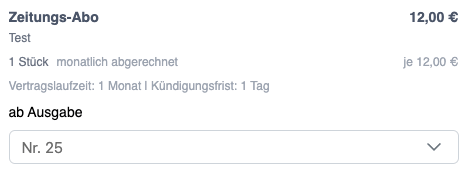
The `checkout.cart.cart_item_option` extension point can be used to display selection options in the cart on the product.
 #### Context Object
The ID of the product
The product number, if specified. Otherwise, this is `null`.
Values of the custom attributes of the product.
The current product / cart item in the cart
The current product ID
#### Operations
The product for which the options should be added.
The name of the option selection, which is available in the webhook.
The name of the option selection, which is displayed in the checkout.
The options available for selection.
Alternatively, product options can be added based on a [custom attribute](/guide/tenant/custom-fields) in the product.
The name of the option selection, which is available in the webhook.
The name of the option selection, which is displayed in the checkout.
The field that must be available in the product as a [custom attribute](/guide/tenant/custom-fields) (Type: List),
to display its list options.
Regex to preselect a list option as default. E.g., `/.* \(Current\)/i` (must contain (Current)).
Whether the option is preselected.
The name of the option, which is displayed in the checkout.
The value of the option, which is available in the webhook.
#### Example
```typescript theme={null}
function run(input) {
return [
{
__type: 'checkout:add_cart_item_option_set',
product: '0ba377f0-d9e9-4338-a107-9209a6e0f1fb',
name: 'from Issue',
label: 'from Issue',
options: [
{
label: 'No. 24',
value: '24'
},
{
label: 'No. 25',
value: '25',
preselected: true,
},
{
label: 'No. 26',
value: '26'
},
]
}
];
}
```
## Register Function
To register a function, create a support ticket to get access to Fynn Functions.
## Global Context Objects
```typescript theme={null}
export type CartItemProduct
export type CartPublicCustomerAddress = {
id: string;
firstName?: string;
lastName?: string;
companyName?: string;
street: string;
houseNumber?: string;
zip: string;
city: string;
addition?: string;
countryCode: string;
costCentre?: string;
vatId?: string;
}
export type CartPublicItem = {
name: string;
description?: string;
quantity: number;
type: 'product' | 'plan' | 'delivery';
id: string;
product: {
id: string;
number: string | null;
customFields: Record;
},
periods?: {
contractPeriod: string;
cancellationPeriod: string;
}[],
quantityDetails: {
aggregationType: 'count' | 'count_unique' | 'max' | 'sum' | 'average' | 'last_value';
unit: string;
description?: string;
quantityEditable: boolean;
},
price: {
currencyCode: string;
taxRate?: number;
totalNetAmount: number;
type: 'recurring' | 'instant_metered' | 'metered';
calculationType: 'flat_fee' | 'per_unit' | 'tiered' | 'volume' | 'stair_step' | 'percentage';
payInAdvance: boolean;
freeUnits?: number;
price: {
amount?: number;
items?: {
from: number;
to?: number;
amount: number;
flatAmount: number;
},
percentage?: number;
fixedAmount?: number;
};
recurring?: {
interval: 'day' | 'week' | 'month' | 'year';
intervalCount?: number;
trialPeriodDays?: number;
recurringAmount?: number;
}
},
optionSets: CartPublicItemOptionSet[];
}
export type CartPublicItemOptionSet = {
label: string;
name: string;
options: CartPublicItemOption[];
}
export type CartPublicItemOption = {
label: string;
value: string | number | boolean;
preselected: boolean;
product?: string | null;
pricePlan?: string | null;
}
export type CartDiscountDetails = {
discount: {
code: string;
name: string;
type: 'percentage' | 'fixed_amount';
percentage?: number;
fixedAmount?: string;
frequency: 'once' | 'limited' | 'lifetime';
frequencyInterval?: number;
};
totalAmount: string;
totalNetBeforeDiscount: string;
};
export type CartPublicPrice = {
amountDue: number;
currencyCode: string;
netAmount?: number;
taxes?: {
netAmount: number;
taxAmount: number;
rate: number;
}[];
discountDetails?: CartDiscountDetails;
}
export type CartPublicSettings = {
allowCoupons: boolean;
forceCompany: boolean;
backButton?: {
label?: string;
url: string;
};
showDeliveryAddress: boolean;
}
export type CartPublic = {
id: string;
customer?: string;
email?: string;
invoiceAddress?: CartPublicCustomerAddress;
deliveryAddress?: CartPublicCustomerAddress;
items: CartPublicItem[];
price: CartPublicPrice;
completionDetails?: {
invoice: {
number: string;
downloadLink: string;
amount: string;
} | null,
payment: {
reference: string | null;
method: string;
bankAccount?: {
iban: string;
bic: string;
bankName: string;
accountHolder: string;
reference: string;
},
qrCode?: string;
},
subscription?: {
number: string;
},
confirmationMessage?: string;
backToProviderUrl?: string | null;
},
settings: CartPublicSettings;
}
```
#### Context Object
The ID of the product
The product number, if specified. Otherwise, this is `null`.
Values of the custom attributes of the product.
The current product / cart item in the cart
The current product ID
#### Operations
The product for which the options should be added.
The name of the option selection, which is available in the webhook.
The name of the option selection, which is displayed in the checkout.
The options available for selection.
Alternatively, product options can be added based on a [custom attribute](/guide/tenant/custom-fields) in the product.
The name of the option selection, which is available in the webhook.
The name of the option selection, which is displayed in the checkout.
The field that must be available in the product as a [custom attribute](/guide/tenant/custom-fields) (Type: List),
to display its list options.
Regex to preselect a list option as default. E.g., `/.* \(Current\)/i` (must contain (Current)).
Whether the option is preselected.
The name of the option, which is displayed in the checkout.
The value of the option, which is available in the webhook.
#### Example
```typescript theme={null}
function run(input) {
return [
{
__type: 'checkout:add_cart_item_option_set',
product: '0ba377f0-d9e9-4338-a107-9209a6e0f1fb',
name: 'from Issue',
label: 'from Issue',
options: [
{
label: 'No. 24',
value: '24'
},
{
label: 'No. 25',
value: '25',
preselected: true,
},
{
label: 'No. 26',
value: '26'
},
]
}
];
}
```
## Register Function
To register a function, create a support ticket to get access to Fynn Functions.
## Global Context Objects
```typescript theme={null}
export type CartItemProduct
export type CartPublicCustomerAddress = {
id: string;
firstName?: string;
lastName?: string;
companyName?: string;
street: string;
houseNumber?: string;
zip: string;
city: string;
addition?: string;
countryCode: string;
costCentre?: string;
vatId?: string;
}
export type CartPublicItem = {
name: string;
description?: string;
quantity: number;
type: 'product' | 'plan' | 'delivery';
id: string;
product: {
id: string;
number: string | null;
customFields: Record;
},
periods?: {
contractPeriod: string;
cancellationPeriod: string;
}[],
quantityDetails: {
aggregationType: 'count' | 'count_unique' | 'max' | 'sum' | 'average' | 'last_value';
unit: string;
description?: string;
quantityEditable: boolean;
},
price: {
currencyCode: string;
taxRate?: number;
totalNetAmount: number;
type: 'recurring' | 'instant_metered' | 'metered';
calculationType: 'flat_fee' | 'per_unit' | 'tiered' | 'volume' | 'stair_step' | 'percentage';
payInAdvance: boolean;
freeUnits?: number;
price: {
amount?: number;
items?: {
from: number;
to?: number;
amount: number;
flatAmount: number;
},
percentage?: number;
fixedAmount?: number;
};
recurring?: {
interval: 'day' | 'week' | 'month' | 'year';
intervalCount?: number;
trialPeriodDays?: number;
recurringAmount?: number;
}
},
optionSets: CartPublicItemOptionSet[];
}
export type CartPublicItemOptionSet = {
label: string;
name: string;
options: CartPublicItemOption[];
}
export type CartPublicItemOption = {
label: string;
value: string | number | boolean;
preselected: boolean;
product?: string | null;
pricePlan?: string | null;
}
export type CartDiscountDetails = {
discount: {
code: string;
name: string;
type: 'percentage' | 'fixed_amount';
percentage?: number;
fixedAmount?: string;
frequency: 'once' | 'limited' | 'lifetime';
frequencyInterval?: number;
};
totalAmount: string;
totalNetBeforeDiscount: string;
};
export type CartPublicPrice = {
amountDue: number;
currencyCode: string;
netAmount?: number;
taxes?: {
netAmount: number;
taxAmount: number;
rate: number;
}[];
discountDetails?: CartDiscountDetails;
}
export type CartPublicSettings = {
allowCoupons: boolean;
forceCompany: boolean;
backButton?: {
label?: string;
url: string;
};
showDeliveryAddress: boolean;
}
export type CartPublic = {
id: string;
customer?: string;
email?: string;
invoiceAddress?: CartPublicCustomerAddress;
deliveryAddress?: CartPublicCustomerAddress;
items: CartPublicItem[];
price: CartPublicPrice;
completionDetails?: {
invoice: {
number: string;
downloadLink: string;
amount: string;
} | null,
payment: {
reference: string | null;
method: string;
bankAccount?: {
iban: string;
bic: string;
bankName: string;
accountHolder: string;
reference: string;
},
qrCode?: string;
},
subscription?: {
number: string;
},
confirmationMessage?: string;
backToProviderUrl?: string | null;
},
settings: CartPublicSettings;
}
```