> ## Documentation Index
> Fetch the complete documentation index at: https://docs.fynn.eu/llms.txt
> Use this file to discover all available pages before exploring further.
# Activity Log
> Track activities and leave comments on important events.
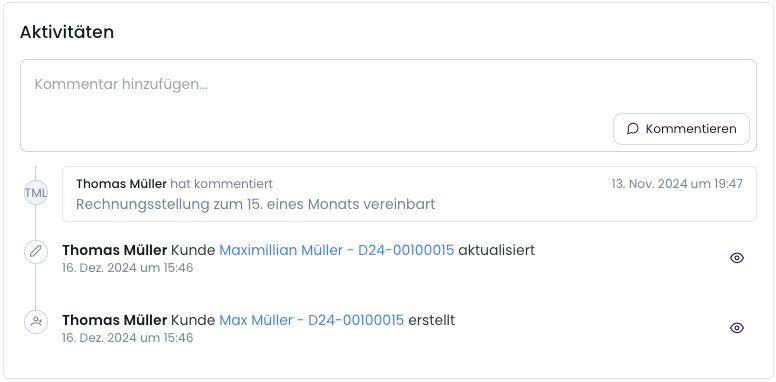
The activity stream provides a central overview of all changes, events, and comments that have been made. This way, you always have an overview of who did what and when.
 ## Supported Objects
The following objects are supported in the activity stream:
* **Subscriptions**: Changes to subscriptions, e.g., status changes, term adjustments.
* **Invoices**: Changes to invoices, such as status changes (e.g., paid, canceled).
* **Credit Notes**: Changes to credit notes, such as status changes (e.g., paid, canceled).
* **Cancellations**: Changes to cancellations, such as status changes (e.g., paid, canceled).
* **Customers**: Tracking of customer information such as name, address, etc.
* **Products**: Changes to products, e.g., prices, details, or attributes.
The activity stream has only been available since December 17, 2024. All changes before this date are not available in the activity stream. For the previous period, changes were logged internally.
## Leave Comments
You can add comments to any supported object to leave additional information or notes. Comments are particularly useful for:
* Internal coordination: Note important details or clarify questions directly on the object.
* Documentation: Leave an explanation for changes, such as why an invoice was canceled.
* Collaboration: Comment with your team directly in context.
Comments currently cannot be edited or deleted. We are working on enabling this feature in the future.
To add comments to an object, one of the following endpoints can be used:
* [Customer: Add Comment](/api-reference/customer/add-comment)
* [Subscription: Add Comment](/api-reference/subscription/add-comment)
* [Invoice: Add Comment](/api-reference/invoice/add-comment)
## Supported Objects
The following objects are supported in the activity stream:
* **Subscriptions**: Changes to subscriptions, e.g., status changes, term adjustments.
* **Invoices**: Changes to invoices, such as status changes (e.g., paid, canceled).
* **Credit Notes**: Changes to credit notes, such as status changes (e.g., paid, canceled).
* **Cancellations**: Changes to cancellations, such as status changes (e.g., paid, canceled).
* **Customers**: Tracking of customer information such as name, address, etc.
* **Products**: Changes to products, e.g., prices, details, or attributes.
The activity stream has only been available since December 17, 2024. All changes before this date are not available in the activity stream. For the previous period, changes were logged internally.
## Leave Comments
You can add comments to any supported object to leave additional information or notes. Comments are particularly useful for:
* Internal coordination: Note important details or clarify questions directly on the object.
* Documentation: Leave an explanation for changes, such as why an invoice was canceled.
* Collaboration: Comment with your team directly in context.
Comments currently cannot be edited or deleted. We are working on enabling this feature in the future.
To add comments to an object, one of the following endpoints can be used:
* [Customer: Add Comment](/api-reference/customer/add-comment)
* [Subscription: Add Comment](/api-reference/subscription/add-comment)
* [Invoice: Add Comment](/api-reference/invoice/add-comment)