> ## Documentation Index
> Fetch the complete documentation index at: https://docs.fynn.eu/llms.txt
> Use this file to discover all available pages before exploring further.
# Billing
> Manage your billing, invoices, and payments.
Customize billing settings to control the display and flow of invoicing for your customers. You can decide, among other things, whether invoices must be manually approved, how prices are displayed, and whether extended details are visible.
## Due Date
Set the default due date for invoices in days. This setting will be applied to all customers unless individually customized.
## Manual Approval
Enable this option if invoices must be manually approved.
## Generate 0.00 Documents
If this option is enabled, documents for 0.00 will also be generated. Otherwise, they will be suppressed. This can be useful for creating transparency or ensuring that all transactions are documented.
## Billing Details
Displays a link to extended billing details in the invoices. This feature increases transparency and helps the customer better understand the billed services.
## GiroCode
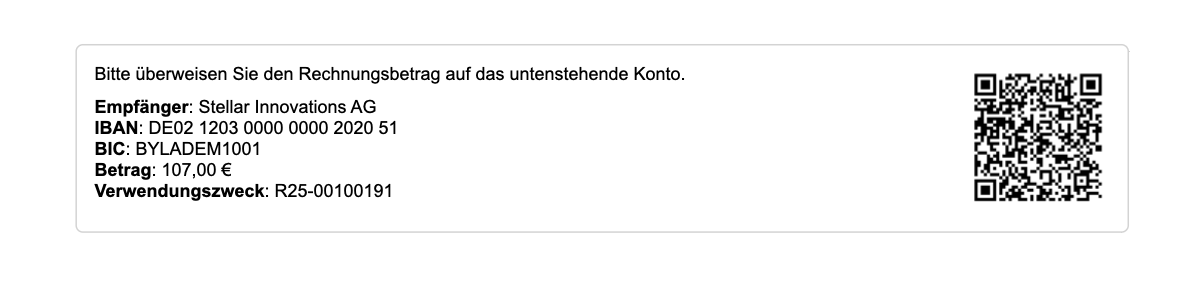 The GiroCode is a QR code that allows your customers to easily pay invoices. This code contains all necessary payment information and can be scanned with a banking app.
## Prices
Enable this option to additionally display the price per unit (e.g., per month or piece) - in addition to the total price.
Example: 10.00 / Month / Piece
## Disable Billing
This feature disables billing for all subscriptions. No new invoices will be created or sent. This option is particularly useful when migrations are being performed.
***
Customize Settings
Go to [Settings > Billing](https://app.fynn.eu/settings/billing).
Enable or disable the desired features such as "Manual Approval", "Show GiroCode", or "Generate 0.00 Documents".
The GiroCode is a QR code that allows your customers to easily pay invoices. This code contains all necessary payment information and can be scanned with a banking app.
## Prices
Enable this option to additionally display the price per unit (e.g., per month or piece) - in addition to the total price.
Example: 10.00 / Month / Piece
## Disable Billing
This feature disables billing for all subscriptions. No new invoices will be created or sent. This option is particularly useful when migrations are being performed.
***
Customize Settings
Go to [Settings > Billing](https://app.fynn.eu/settings/billing).
Enable or disable the desired features such as "Manual Approval", "Show GiroCode", or "Generate 0.00 Documents".
 Save your changes in the top right corner.
Would you like to document additional sections such as "Invoice Numbers", "Taxes", or "Currencies"?
Save your changes in the top right corner.
Would you like to document additional sections such as "Invoice Numbers", "Taxes", or "Currencies"?