> ## Documentation Index
> Fetch the complete documentation index at: https://docs.fynn.eu/llms.txt
> Use this file to discover all available pages before exploring further.
# HubSpot
> Learn how to connect Fynn with HubSpot to create quotes as deals and synchronize contacts.
 The HubSpot integration enables a seamless connection between Fynn and HubSpot to create quotes from Fynn as deals in HubSpot and synchronize them with the pipeline. Additionally, contacts are synchronized, and status information about signed documents and views is displayed in the deal pipeline. You can also create a quote directly on a contact/company in HubSpot. Learn more about the features of the HubSpot integration and how to use it in Fynn:
## Benefits
* **Create deals from quotes**: With the HubSpot integration, you can create quotes from Fynn directly as deals in HubSpot and synchronize them with the pipeline to optimize the sales process.
* **Synchronization of contacts**: The integration synchronizes contacts between Fynn and HubSpot to ensure that your customer data is always up to date.
* **Synchronization of status information**: Status information about signed documents and views is synchronized as timeline events so that your team can track the progress of customer interactions.
* **Direct quote creation in HubSpot**: You can also create a quote directly on a contact/company in HubSpot to make the sales process even more efficient.
This integration is only available in combination with the Quotes addon.
## Connect HubSpot
Open the settings in Fynn under "Settings" and click on ["CRM"](https://app.fynn.eu/settings/crm).
Click "Connect HubSpot" and log in with your HubSpot account. You will now
be redirected to HubSpot to grant Fynn the required permissions.
The HubSpot integration enables a seamless connection between Fynn and HubSpot to create quotes from Fynn as deals in HubSpot and synchronize them with the pipeline. Additionally, contacts are synchronized, and status information about signed documents and views is displayed in the deal pipeline. You can also create a quote directly on a contact/company in HubSpot. Learn more about the features of the HubSpot integration and how to use it in Fynn:
## Benefits
* **Create deals from quotes**: With the HubSpot integration, you can create quotes from Fynn directly as deals in HubSpot and synchronize them with the pipeline to optimize the sales process.
* **Synchronization of contacts**: The integration synchronizes contacts between Fynn and HubSpot to ensure that your customer data is always up to date.
* **Synchronization of status information**: Status information about signed documents and views is synchronized as timeline events so that your team can track the progress of customer interactions.
* **Direct quote creation in HubSpot**: You can also create a quote directly on a contact/company in HubSpot to make the sales process even more efficient.
This integration is only available in combination with the Quotes addon.
## Connect HubSpot
Open the settings in Fynn under "Settings" and click on ["CRM"](https://app.fynn.eu/settings/crm).
Click "Connect HubSpot" and log in with your HubSpot account. You will now
be redirected to HubSpot to grant Fynn the required permissions.
 Click "Approve" to grant Fynn the required permissions.
After you have granted the permissions, you will be redirected back to Fynn and the integration is complete.
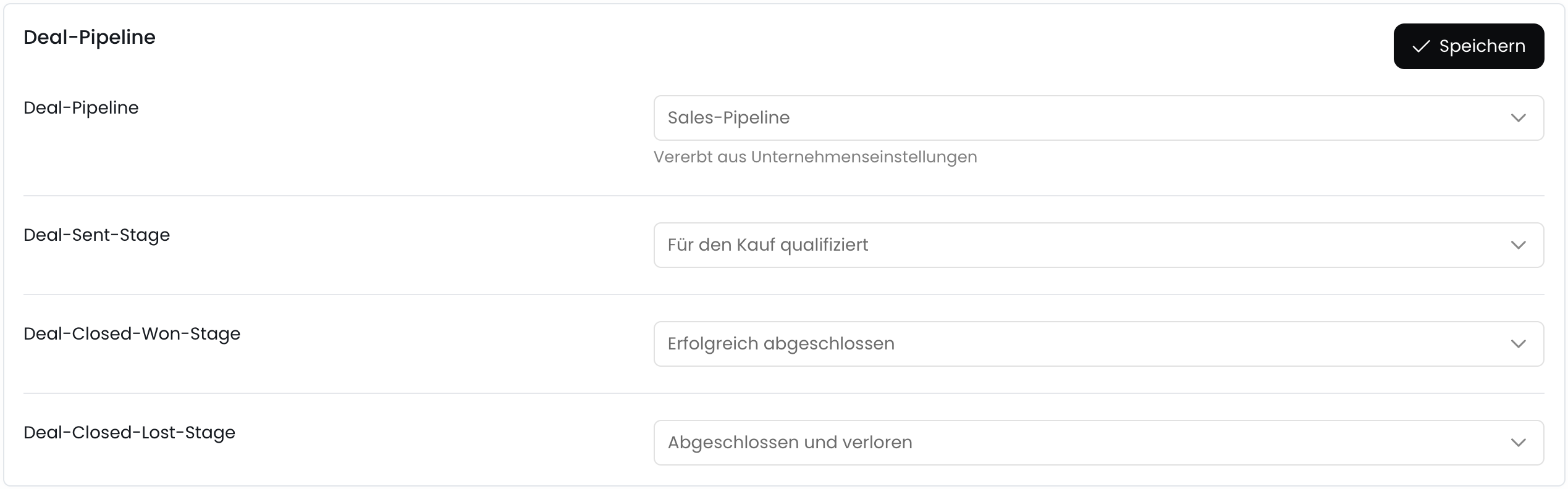
After you have granted the permissions, you can configure the pipeline and stages that you want to synchronize with HubSpot.
Select the pipeline in which the deals from Fynn should be created.
When a quote is sent to recipients in Fynn, the deal in HubSpot will be moved to this stage.
When a quote is signed by a recipient in Fynn, the deal in HubSpot will be moved to this stage.
When a quote is rejected or canceled by a recipient in Fynn, the deal in HubSpot will be moved to this stage.
Click "Approve" to grant Fynn the required permissions.
After you have granted the permissions, you will be redirected back to Fynn and the integration is complete.
After you have granted the permissions, you can configure the pipeline and stages that you want to synchronize with HubSpot.
Select the pipeline in which the deals from Fynn should be created.
When a quote is sent to recipients in Fynn, the deal in HubSpot will be moved to this stage.
When a quote is signed by a recipient in Fynn, the deal in HubSpot will be moved to this stage.
When a quote is rejected or canceled by a recipient in Fynn, the deal in HubSpot will be moved to this stage.
 The HubSpot integration is now successfully set up and you can create quotes from Fynn directly as deals in HubSpot and synchronize them with the pipeline.
## Create Quotes / Deals
To create quotes from Fynn as deals in HubSpot, see the [Quotes](/guide/offers/introduction) section.
The HubSpot integration is now successfully set up and you can create quotes from Fynn directly as deals in HubSpot and synchronize them with the pipeline.
## Create Quotes / Deals
To create quotes from Fynn as deals in HubSpot, see the [Quotes](/guide/offers/introduction) section.