> ## Documentation Index
> Fetch the complete documentation index at: https://docs.fynn.eu/llms.txt
> Use this file to discover all available pages before exploring further.
# Custom PDF Rendering
> Use your own PDF rendering engine for invoices, credit notes, and cancellations.
This feature is only available in the **Enterprise** plan. Contact our sales team at [sales@fynn.eu](mailto:sales@fynn.eu) for more information.
## Overview
With Custom PDF Rendering, you can use your own PDF rendering engine to generate invoices, credit notes, and cancellations according to your individual requirements. This enables:
* **Complete Design Control**: Design documents exactly according to your corporate design guidelines
* **Custom Template Engines**: Use your preferred template engine (LaTeX, Typst, etc.)
* **Complex Layouts**: Create multi-page documents with complex tables and graphics
* **Integration with Existing Systems**: Seamlessly integrate your existing document generation
## How It Works
```mermaid theme={null}
sequenceDiagram
participant F as Fynn
participant W as Your Webhook Server
participant P as Your PDF Engine
F->>F: Finalize document
F->>W: Webhook: invoice.pdf.generation_requested
W->>P: Generate PDF
P->>W: PDF file
W->>F: POST /api/invoices/{id}/pdf
F->>F: Complete finalization
```
1. **Document is finalized**: When a document is finalized, it transitions to `STATUS_FINALIZING` status
2. **Webhook is triggered**: Fynn sends the `invoice.pdf.generation_requested` webhook with all document data
3. **Generate PDF**: Your system generates the PDF with your own rendering engine
4. **Upload PDF**: The finished PDF is sent back to Fynn via the API
5. **Complete finalization**: Fynn completes the finalization process (ZUGFeRD embedding, sending, etc.)
## Configuration
### 1. Enable Feature
Contact Fynn support to enable the feature for your organization.
### 2. Register Webhook
Register a webhook for the `invoice.pdf.generation_requested` event:
Navigate to **Settings** > **Webhooks**
Click **New Webhook** and configure:
* **URL**: The URL of your webhook endpoint
* **Events**: Select `invoice.pdf.generation_requested`
* **Secret**: A secure secret for signature validation
```bash theme={null}
POST /webhooks
{
"url": "https://your-server.com/webhooks/fynn",
"events": ["invoice.pdf.generation_requested"],
"version": "v1",
"enabled": true
}
```
The webhook secret is automatically generated and can be retrieved from the webhook details after creation.
### 3. Configure Settings
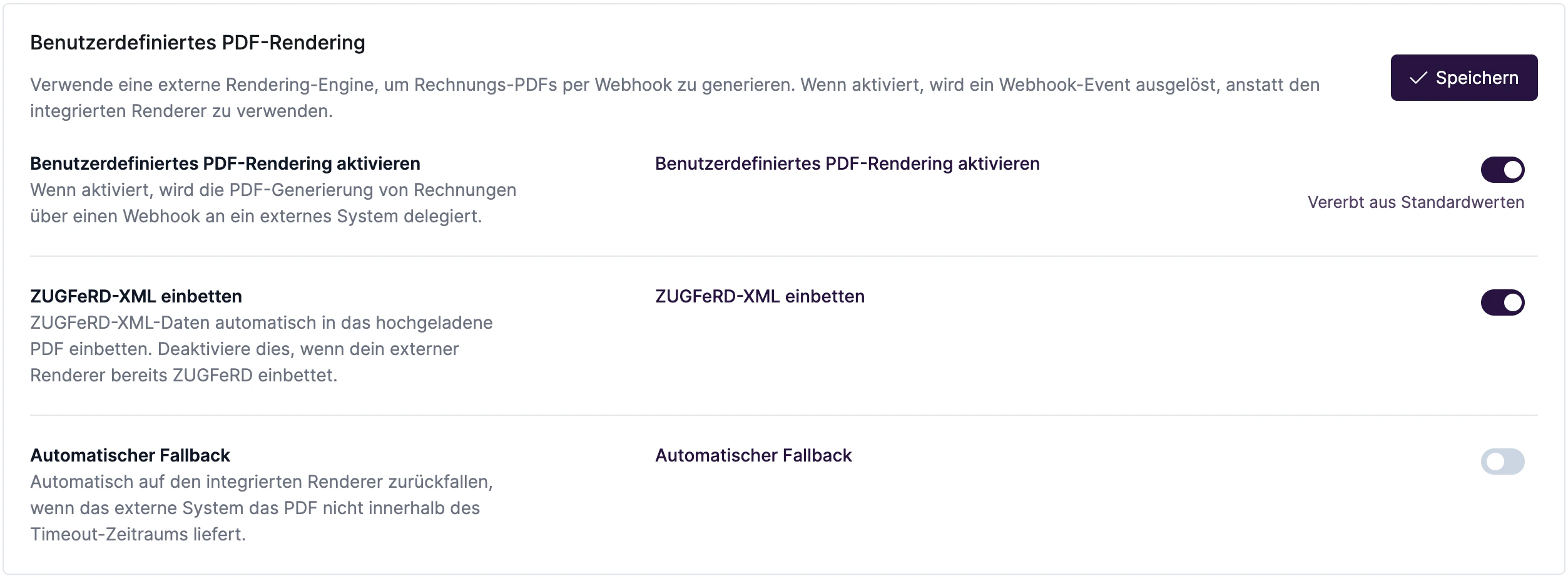
Under **Settings** > **Billing** > **Custom PDF Rendering** you can configure the following options:
 | Setting | Description | Default |
| ------------------------------- | --------------------------------------------------------------------------------------------------------------------------- | -------- |
| **Enable Custom PDF Rendering** | When enabled, document PDF generation is delegated to an external system via webhook. | Disabled |
| **Embed ZUGFeRD XML** | Automatically embed ZUGFeRD XML data into the uploaded PDF. Disable this if your external renderer already embeds ZUGFeRD. | Enabled |
| **Automatic Fallback** | Automatically fall back to the built-in renderer if the external system does not deliver the PDF within the timeout period. | Disabled |
| **Timeout** | Timeout in minutes (1-1440) | 30 |
## Webhook Payload
The `invoice.pdf.generation_requested` webhook contains all document data:
```json theme={null}
{
"event": {
"id": "01JKXYZ1234567890ABCDEFGH",
"type": "invoice.pdf.generation_requested",
"version": "v1",
"createdAt": "2026-02-09T10:00:00+00:00"
},
"data": {
"invoice": {
"id": "550e8400-e29b-41d4-a716-446655440000",
"number": "INV-2026-0001",
"type": "TYPE_INVOICE",
"status": "STATUS_FINALIZING",
...
}
}
}
```
## Upload PDF
After PDF generation, the document must be uploaded via the API:
```bash theme={null}
curl -X POST "https://coreapi.io/api/invoices/{invoiceId}/pdf" \
-H "Authorization: Bearer YOUR_API_TOKEN" \
-F "file=@invoice.pdf"
```
### Endpoint Details
| Method | Path | Description |
| ------ | ------------------------ | ----------------------- |
| `POST` | `/api/invoices/{id}/pdf` | Upload PDF for document |
### Request
* **Content-Type**: `multipart/form-data`
* **Field**: `file` - The PDF file (MIME type: `application/pdf`)
### Response
**200 OK**
```json theme={null}
{
"id": "550e8400-e29b-41d4-a716-446655440000",
"status": "STATUS_UNPAID",
"message": "PDF uploaded and invoice finalization continued."
}
```
### Error Codes
| Code | Description |
| ----- | --------------------------------------------- |
| `404` | Document not found |
| `409` | Document is not in `STATUS_FINALIZING` status |
| `422` | Invalid file (not a PDF) |
## Timeout and Fallback
When Custom PDF Rendering is enabled, Fynn waits for the PDF to be uploaded. If the PDF is not uploaded in time:
* **With fallback enabled**: After the timeout expires, Fynn automatically generates the PDF with the internal rendering engine
* **Without fallback**: The document remains in `STATUS_FINALIZING` status until the PDF is manually uploaded
Ensure your system uploads the PDF within the configured timeout to avoid delays in document processing.
## ZUGFeRD Embedding
When `embedZugferd` is enabled, Fynn automatically embeds the ZUGFeRD/Factur-X XML data into the uploaded PDF. This ensures compliance with the German e-invoicing standard.
You don't need to handle ZUGFeRD generation – Fynn handles the embedding automatically after upload.
## Best Practices
### Webhook Processing
1. **Asynchronous Processing**: Acknowledge the webhook immediately (HTTP 200) and process PDF generation asynchronously
2. **Idempotency**: Implement idempotency to handle duplicate webhook calls
3. **Retry Logic**: Implement retries for PDF upload on temporary failures
### PDF Requirements
* **Format**: PDF/A-3 is recommended for best ZUGFeRD compatibility
* **Size**: Maximum 10 MB
* **Quality**: At least 150 DPI for embedded images
### Security
* Validate the webhook signature
* Use HTTPS for all API calls
* Store API tokens securely
## Example Implementation (Node.js)
```javascript theme={null}
const express = require('express');
const crypto = require('crypto');
const FormData = require('form-data');
const axios = require('axios');
const app = express();
app.use(express.json());
app.post('/webhooks/fynn', async (req, res) => {
// 1. Acknowledge webhook immediately
res.status(200).send('OK');
// 2. Validate signature
const signature = req.headers['x-fynn-signature'];
const expectedSignature = crypto
.createHmac('sha256', process.env.WEBHOOK_SECRET)
.update(JSON.stringify(req.body))
.digest('hex');
if (signature !== expectedSignature) {
console.error('Invalid webhook signature');
return;
}
// 3. Generate PDF (your own logic)
const { invoice } = req.body.data;
const pdfBuffer = await generateInvoicePdf(invoice);
// 4. Upload PDF to Fynn
const form = new FormData();
form.append('file', pdfBuffer, {
filename: `invoice-${invoice.number}.pdf`,
contentType: 'application/pdf'
});
await axios.post(
`https://coreapi.io/api/invoices/${invoice.id}/pdf`,
form,
{
headers: {
...form.getHeaders(),
'Authorization': `Bearer ${process.env.FYNN_API_TOKEN}`
}
}
);
});
async function generateInvoicePdf(invoice) {
// Implement your PDF generation here
// e.g., with Puppeteer, PDFKit, LaTeX, etc.
}
```
## Troubleshooting
### PDF Not Accepted
* Ensure the file is a valid PDF
* Check that the document is in `STATUS_FINALIZING` status
* Validate that you're using the correct invoice ID
### Webhook Not Received
* Check that the webhook is registered for `invoice.pdf.generation_requested`
* Ensure your endpoint is reachable
* Check the webhook logs in Fynn settings
### Timeout Errors
* Increase the `timeoutMinutes` value
* Optimize your PDF generation
* Enable fallback for critical situations
## API Reference
For more details on the API, see the [API documentation](/api-reference/invoice/upload-invoice-pdf).
| Setting | Description | Default |
| ------------------------------- | --------------------------------------------------------------------------------------------------------------------------- | -------- |
| **Enable Custom PDF Rendering** | When enabled, document PDF generation is delegated to an external system via webhook. | Disabled |
| **Embed ZUGFeRD XML** | Automatically embed ZUGFeRD XML data into the uploaded PDF. Disable this if your external renderer already embeds ZUGFeRD. | Enabled |
| **Automatic Fallback** | Automatically fall back to the built-in renderer if the external system does not deliver the PDF within the timeout period. | Disabled |
| **Timeout** | Timeout in minutes (1-1440) | 30 |
## Webhook Payload
The `invoice.pdf.generation_requested` webhook contains all document data:
```json theme={null}
{
"event": {
"id": "01JKXYZ1234567890ABCDEFGH",
"type": "invoice.pdf.generation_requested",
"version": "v1",
"createdAt": "2026-02-09T10:00:00+00:00"
},
"data": {
"invoice": {
"id": "550e8400-e29b-41d4-a716-446655440000",
"number": "INV-2026-0001",
"type": "TYPE_INVOICE",
"status": "STATUS_FINALIZING",
...
}
}
}
```
## Upload PDF
After PDF generation, the document must be uploaded via the API:
```bash theme={null}
curl -X POST "https://coreapi.io/api/invoices/{invoiceId}/pdf" \
-H "Authorization: Bearer YOUR_API_TOKEN" \
-F "file=@invoice.pdf"
```
### Endpoint Details
| Method | Path | Description |
| ------ | ------------------------ | ----------------------- |
| `POST` | `/api/invoices/{id}/pdf` | Upload PDF for document |
### Request
* **Content-Type**: `multipart/form-data`
* **Field**: `file` - The PDF file (MIME type: `application/pdf`)
### Response
**200 OK**
```json theme={null}
{
"id": "550e8400-e29b-41d4-a716-446655440000",
"status": "STATUS_UNPAID",
"message": "PDF uploaded and invoice finalization continued."
}
```
### Error Codes
| Code | Description |
| ----- | --------------------------------------------- |
| `404` | Document not found |
| `409` | Document is not in `STATUS_FINALIZING` status |
| `422` | Invalid file (not a PDF) |
## Timeout and Fallback
When Custom PDF Rendering is enabled, Fynn waits for the PDF to be uploaded. If the PDF is not uploaded in time:
* **With fallback enabled**: After the timeout expires, Fynn automatically generates the PDF with the internal rendering engine
* **Without fallback**: The document remains in `STATUS_FINALIZING` status until the PDF is manually uploaded
Ensure your system uploads the PDF within the configured timeout to avoid delays in document processing.
## ZUGFeRD Embedding
When `embedZugferd` is enabled, Fynn automatically embeds the ZUGFeRD/Factur-X XML data into the uploaded PDF. This ensures compliance with the German e-invoicing standard.
You don't need to handle ZUGFeRD generation – Fynn handles the embedding automatically after upload.
## Best Practices
### Webhook Processing
1. **Asynchronous Processing**: Acknowledge the webhook immediately (HTTP 200) and process PDF generation asynchronously
2. **Idempotency**: Implement idempotency to handle duplicate webhook calls
3. **Retry Logic**: Implement retries for PDF upload on temporary failures
### PDF Requirements
* **Format**: PDF/A-3 is recommended for best ZUGFeRD compatibility
* **Size**: Maximum 10 MB
* **Quality**: At least 150 DPI for embedded images
### Security
* Validate the webhook signature
* Use HTTPS for all API calls
* Store API tokens securely
## Example Implementation (Node.js)
```javascript theme={null}
const express = require('express');
const crypto = require('crypto');
const FormData = require('form-data');
const axios = require('axios');
const app = express();
app.use(express.json());
app.post('/webhooks/fynn', async (req, res) => {
// 1. Acknowledge webhook immediately
res.status(200).send('OK');
// 2. Validate signature
const signature = req.headers['x-fynn-signature'];
const expectedSignature = crypto
.createHmac('sha256', process.env.WEBHOOK_SECRET)
.update(JSON.stringify(req.body))
.digest('hex');
if (signature !== expectedSignature) {
console.error('Invalid webhook signature');
return;
}
// 3. Generate PDF (your own logic)
const { invoice } = req.body.data;
const pdfBuffer = await generateInvoicePdf(invoice);
// 4. Upload PDF to Fynn
const form = new FormData();
form.append('file', pdfBuffer, {
filename: `invoice-${invoice.number}.pdf`,
contentType: 'application/pdf'
});
await axios.post(
`https://coreapi.io/api/invoices/${invoice.id}/pdf`,
form,
{
headers: {
...form.getHeaders(),
'Authorization': `Bearer ${process.env.FYNN_API_TOKEN}`
}
}
);
});
async function generateInvoicePdf(invoice) {
// Implement your PDF generation here
// e.g., with Puppeteer, PDFKit, LaTeX, etc.
}
```
## Troubleshooting
### PDF Not Accepted
* Ensure the file is a valid PDF
* Check that the document is in `STATUS_FINALIZING` status
* Validate that you're using the correct invoice ID
### Webhook Not Received
* Check that the webhook is registered for `invoice.pdf.generation_requested`
* Ensure your endpoint is reachable
* Check the webhook logs in Fynn settings
### Timeout Errors
* Increase the `timeoutMinutes` value
* Optimize your PDF generation
* Enable fallback for critical situations
## API Reference
For more details on the API, see the [API documentation](/api-reference/invoice/upload-invoice-pdf).