

Benefits
- Create deals from quotes: With the HubSpot integration, you can create quotes from Fynn directly as deals in HubSpot and synchronize them with the pipeline to optimize the sales process.
- Synchronization of contacts: The integration synchronizes contacts between Fynn and HubSpot to ensure that your customer data is always up to date.
- Synchronization of status information: Status information about signed documents and views is synchronized as timeline events so that your team can track the progress of customer interactions.
- Direct quote creation in HubSpot: You can also create a quote directly on a contact/company in HubSpot to make the sales process even more efficient.
This integration is only available in combination with the Quotes addon.
Connect HubSpot
1
Open settings
Open the settings in Fynn under “Settings” and click on “CRM”.
2
Connect HubSpot
Click “Connect HubSpot” and log in with your HubSpot account. You will now
be redirected to HubSpot to grant Fynn the required permissions.
3
Grant permissions
Click “Approve” to grant Fynn the required permissions.After you have granted the permissions, you will be redirected back to Fynn and the integration is complete.
4
Configure pipeline and stages
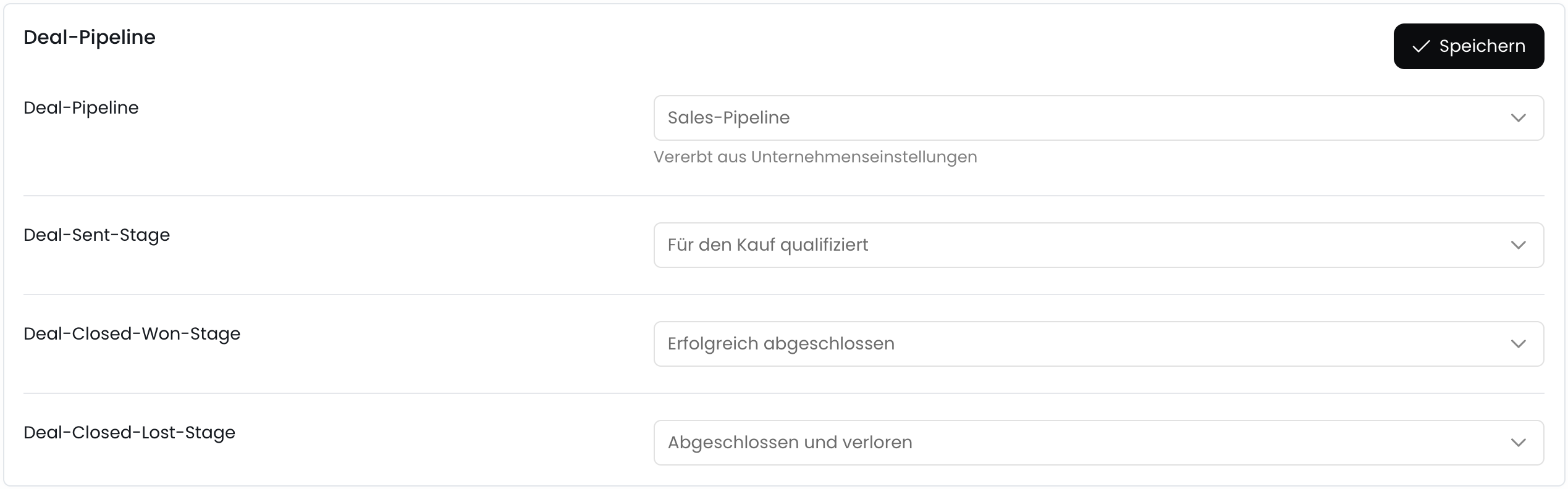
After you have granted the permissions, you can configure the pipeline and stages that you want to synchronize with HubSpot.
Deal Pipeline
Deal Pipeline
Select the pipeline in which the deals from Fynn should be created.
Deal Sent Stage
Deal Sent Stage
When a quote is sent to recipients in Fynn, the deal in HubSpot will be moved to this stage.
Deal Closed Won Stage
Deal Closed Won Stage
When a quote is signed by a recipient in Fynn, the deal in HubSpot will be moved to this stage.
Deal Closed Lost Stage
Deal Closed Lost Stage
When a quote is rejected or canceled by a recipient in Fynn, the deal in HubSpot will be moved to this stage.
5
Setup completed
The HubSpot integration is now successfully set up and you can create quotes from Fynn directly as deals in HubSpot and synchronize them with the pipeline.
Create Quotes / Deals
To create quotes from Fynn as deals in HubSpot, see the Quotes section.Billing progress in HubSpot
In HubSpot you can see a billing progress card on every contact and company record: how much has already been invoiced for that customer and, for contracts with a fixed total volume, how much is still outstanding. For individual subscriptions there is an additional progress view at the subscription level. For open-ended subscriptions without a fixed contract volume, only the amount already invoiced is shown. There is no meaningful target amount to display.The card appears automatically in the sidebar as soon as invoices exist for the customer in Fynn.
Fynn → HubSpot field synchronization
Alongside mapping HubSpot fields into Fynn, you can also set up the reverse direction: Fynn data is written to HubSpot. This keeps values such as the next billing date, the contract status or the customer number up to date in HubSpot without manual work. You configure it in the HubSpot settings in the “Fynn → HubSpot” card, right next to the existing field mapping.What can be synchronized?
The synchronization is split into three areas:Customers
Company name, customer number, VAT ID, country, status, email and your own fields.
Subscriptions
Contract start, contract end, cancellation date, next billing date, status, subscription number, term, contract value and your own fields.
Assets
Main identifier, status, type, delivery date and further attributes.
For a field to be written, HubSpot must be connected and the Fynn record must be linked to a HubSpot object: customers to a HubSpot company via the existing mapping, subscriptions to a linked deal. Without this link there is no target for Fynn to write to.
Setting it up
1
Choose an area
In the “Fynn → HubSpot” card, switch to the “Customers”, “Subscriptions” or “Assets” tab.
2
Choose the HubSpot object
For a Fynn field, define which HubSpot object it is written to.
3
Choose the HubSpot property
Select the target property in HubSpot. All properties of the chosen object are available, including your own.
A HubSpot property can only be filled by a single Fynn field. If you select a target that is already in use, Fynn shows a hint and saving is only possible after you resolve it.