

Overview
Digest emails consolidate the most important metrics and outstanding tasks of your organization into a single email. This gives you a compact overview without having to log into the platform. Each user can individually configure which information they want to receive and how frequently digest emails are sent.User Account Area
The digest email settings are located in your personal user account area. There you can manage your profile and configure your notification preferences.Configure Notifications
1
Open User Account Area
Click on your avatar or name in the top navigation and select My Profile.
2
Select Notifications
Choose the Notifications tab in the left sidebar.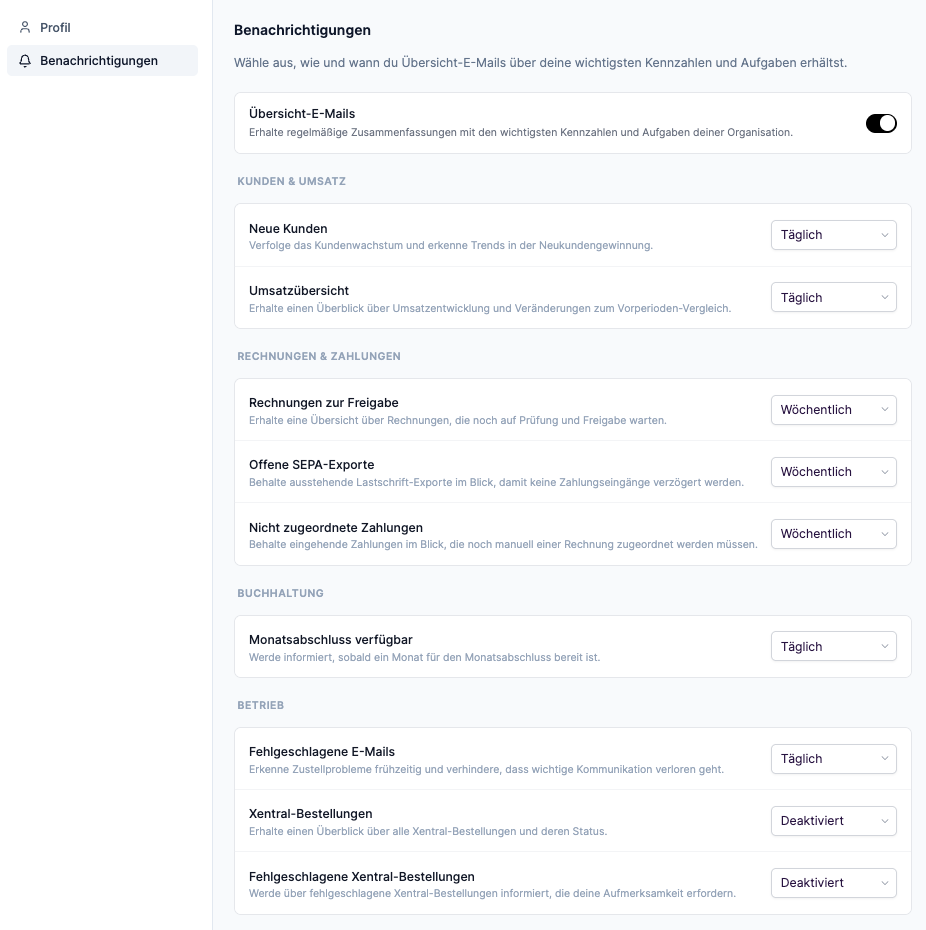
3
Enable Digest Emails
Enable the Digest Emails master toggle to receive periodic summaries. If the toggle is disabled, no digest emails will be sent.
4
Configure Sections
Select the desired frequency for each available section:
- Daily — Receive the section in daily emails (Monday through Friday)
- Weekly — Receive the section once per week
- Disabled — The section will not be included in your emails
Which sections are available to you depends on your permissions. You will only see sections for which your user role has the required rights. If your role changes, the available sections are automatically adjusted.
Available Sections
Sections are organized into categories. Each section can be individually enabled or disabled.Customers & Revenue
New Customers
Track customer growth and identify trends in new customer acquisition. Shows the number of new customers in the selected period.
Revenue Summary
Get an overview of revenue development and changes compared to the previous period.
Invoices & Payments
Pending Invoices
Get an overview of invoices that are still awaiting review and approval.
Pending SEPA Exports
Keep track of outstanding direct debit exports to prevent delayed payment receipts.
Unassigned Payments
Keep track of incoming payments that still need to be manually assigned to an invoice.
The notification for pending SEPA XML exports is now managed through digest emails and can be individually configured per user. Previously, this information was sent system-wide.
Accounting
Month Closing Available
Get notified as soon as a month is ready for closing.
Operations
Failed Emails
Detect delivery problems early and prevent important communication from being lost.
Xentral Orders
Get an overview of all Xentral orders and their status.
Failed Xentral Orders
Get notified about failed Xentral orders that require your attention.
The Xentral sections are only visible when the Xentral integration is enabled for your tenant.
Frequency & Delivery
Daily Emails
- Sent every weekday (Monday through Friday)
- Contains data from the last 24 hours
- Comparison with the previous day
Weekly Emails
- Sent every Monday
- Contains data from the last 7 days
- Comparison with the previous week
Empty Periods
If there is no relevant data in a period (e.g., no new customers, no pending invoices), no email will be sent. You will only receive an email when at least one enabled section contains data.Frequently Asked Questions
Why can't I see certain sections?
Why can't I see certain sections?
The available sections depend on your user permissions. You will only see sections for which your role has the required rights. Contact an administrator if you need access to additional sections.
Can I change the delivery time?
Can I change the delivery time?
The delivery time is set by the system. Weekly emails are always sent on Mondays.
What happens when my permissions change?
What happens when my permissions change?
Changes to your user role automatically affect the available sections. If a permission is revoked, the corresponding section will no longer appear in your next email. New permissions are also automatically applied.
Why am I not receiving any emails?
Why am I not receiving any emails?
Emails are only sent when at least one enabled section contains data. Check that the master toggle is enabled and that at least one section is set to “Daily” or “Weekly”.
What happened to the SEPA export notification?
What happened to the SEPA export notification?
The notification for pending SEPA XML exports is now part of digest emails. You can configure it individually in your user account area under “Notifications”.