

Discounts
There are two types of discounts you can create:- Percentage Discount: A percentage discount is applied to the total amount.
- Fixed Amount: A fixed amount is deducted from the unit price.
Create Discount
- Use Web App
- Use API
1
Open the Create Form
Select Discounts from the main menu to display the list of discounts. Click New.
2
Configure Discount
Fill in the fields: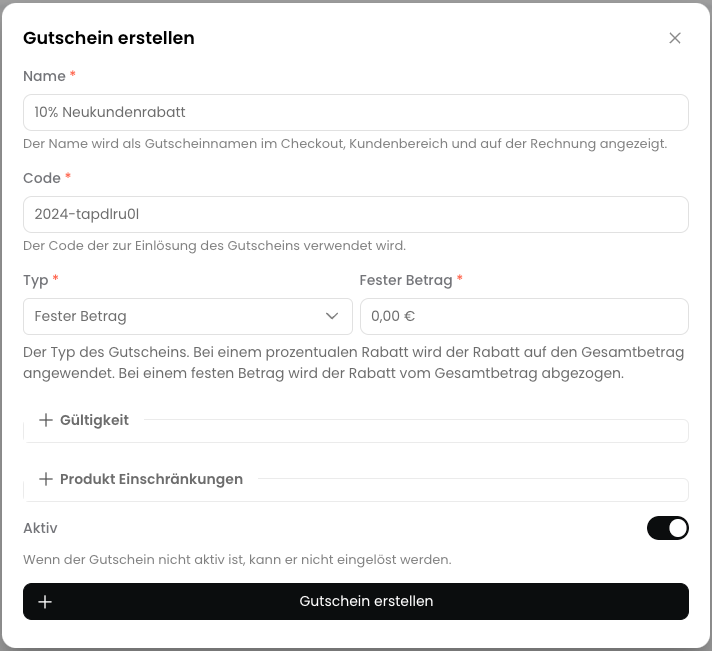
- Name: The name of the discount. This is displayed to the customer in the Checkout.
- Code: The code that the customer must enter in the Checkout to receive the discount.
- Type: The type of discount. Choose between a percentage discount and a fixed amount.
- Percentage Discount: The percentage discount applied to the total amount.
- Fixed Amount: The fixed amount deducted from the total amount.
- Active: Whether the discount is active or not.
3
Set Validity (optional)
You can set the validity of the discount: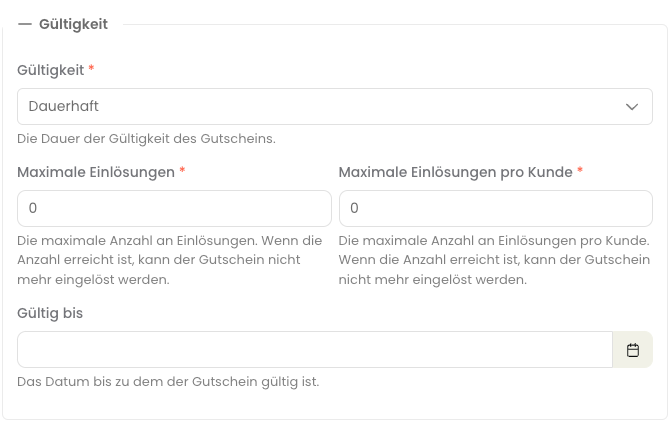
- Lifetime: The discount is valid until the subscription ends.
- One-time at Start: The discount is applied once on the first invoice.
- Limited to x Billing Periods: The discount is applied for a certain number of billing periods.
- Number of Billing Periods: The number of billing periods for which the discount is valid (only for “Limited to x Billing Periods”).
- Maximum Redemptions: The maximum number of redemptions of the discount - only relevant for the cart.
- Maximum Redemptions per Customer: The maximum number of redemptions of the discount per customer - only relevant for the cart.
- Valid Until: The date until which the discount is valid in the cart.
Billing periods are the time periods in which a customer is invoiced for a subscription. Billing periods can be daily, weekly, monthly, or yearly.
4
Set Product Restrictions (optional)
You can restrict the discount to specific products. Under “Valid for Products”, you can select the products for which the discount should be valid.
Under “Excluded Products”, you can select products for which the discount should not be valid. Both fields cannot be used simultaneously.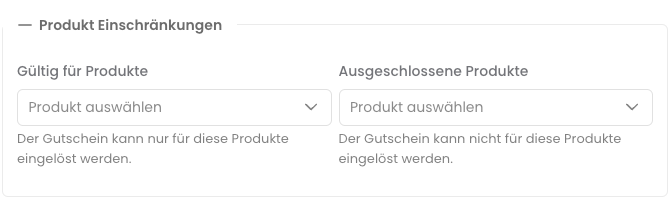
5
Create Discount
Click Create Coupon to create the discount.
Adjust Discount
- Use Web App
- Use API
You can edit a discount by clicking on the discount in the list and adjusting the values. Click Save to save the changes.All fields that can be configured when creating a discount are also available when editing.
Delete Discount
- Use Web App
- Use API
You can delete a discount by clicking on the three dots next to the discount in the list and selecting Delete. Confirm the action to delete the discount.