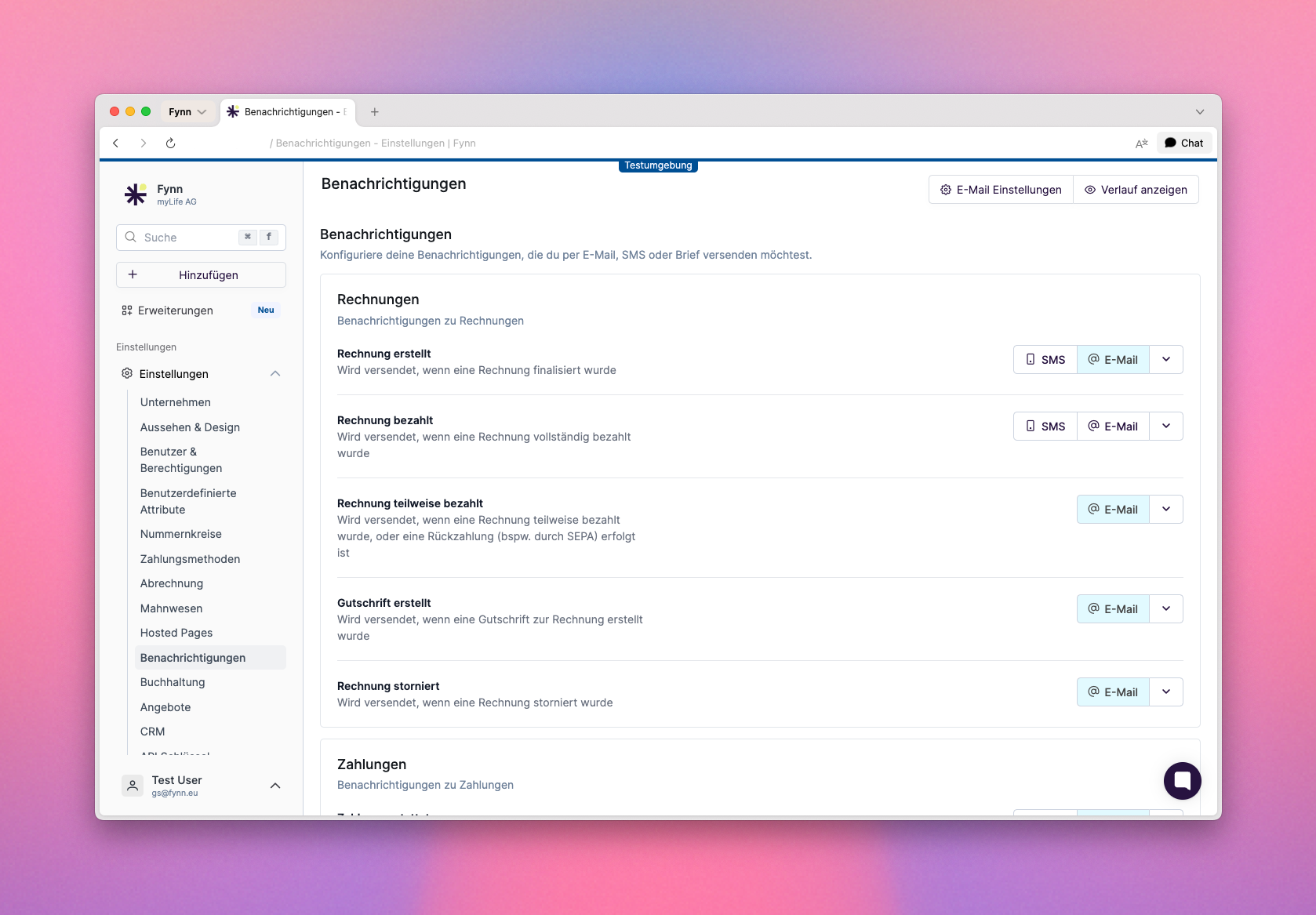
Fynn offers a variety of notifications that you can customize to be informed about important events in your organization. These notifications can be sent via email or through other channels.
Email notifications are available in German and English. The language is automatically determined based on the customer profile.
Fynn supports multilingual email templates. Each notification can have a separate German and English template, which are edited and versioned independently.How it works:
Customers automatically receive emails in the language configured in their profile (“Language” field)
In the template editor, switch between the German and English versions using language tabs
Use the built-in AI translation to translate the German template to English with a single click
Review and edit the generated translation before saving
Global email headers and footers can also be configured per language
System texts (e.g. “Managing Director”, “Open email in browser”) are automatically displayed in the customer’s language
If no English template is configured for a notification, the German version is used automatically. You can add English templates gradually.
To configure notifications, go to Settings > Notifications. Here you can view and customize the various available notifications.For each notification, you can specify whether it is enabled and which template is used.
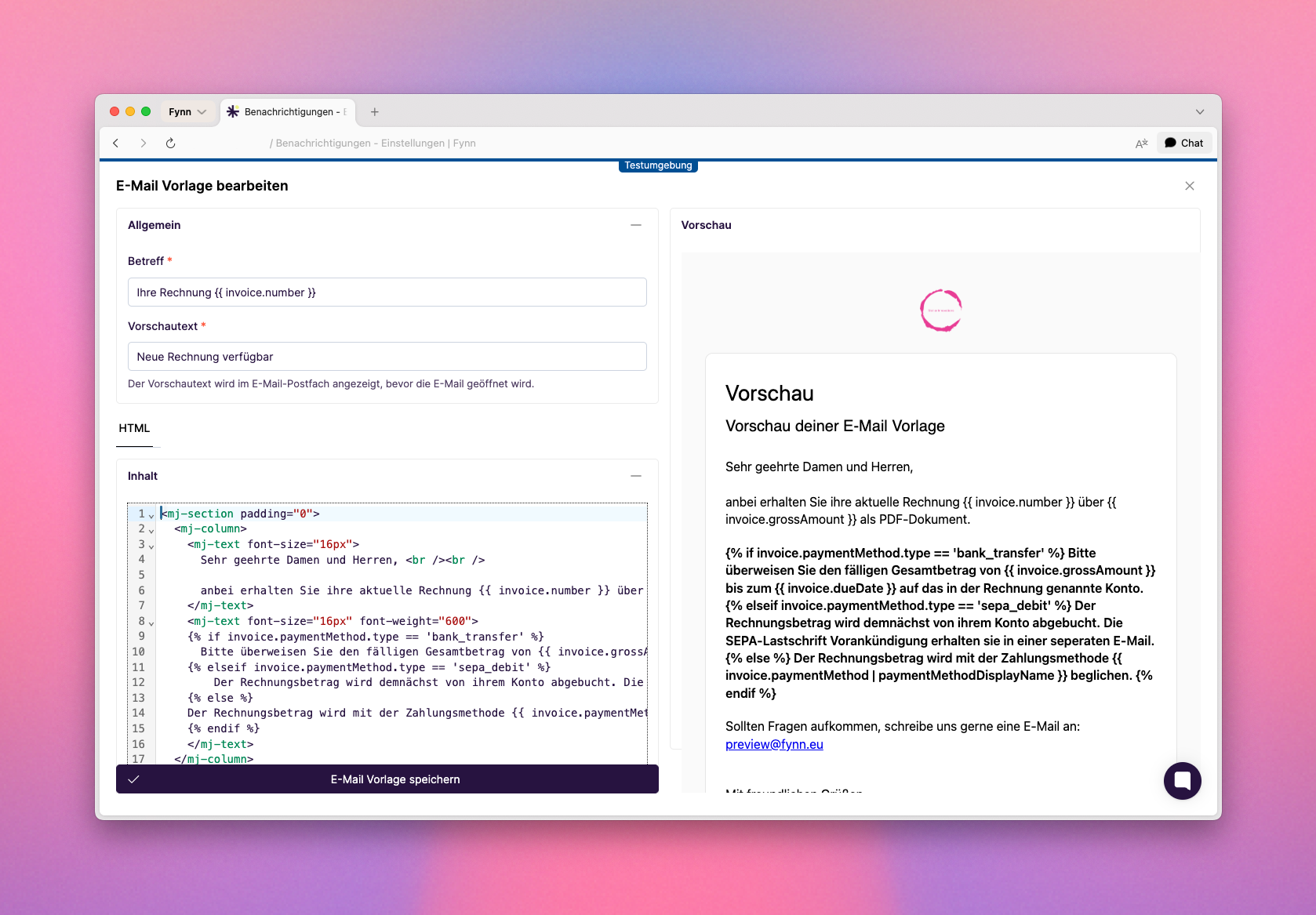
Email templates are written in MJML format, which provides an easy way to create responsive emails. You can customize the templates to change the style and content of the emails sent to your users.The templates contain placeholders that are automatically replaced with the corresponding information when the email is sent. These placeholders are enclosed in curly braces, e.g., {{ invoice.number }} for the invoice number.An exact list of available placeholders is currently not available, but you can customize and test the templates directly in the Fynn app.
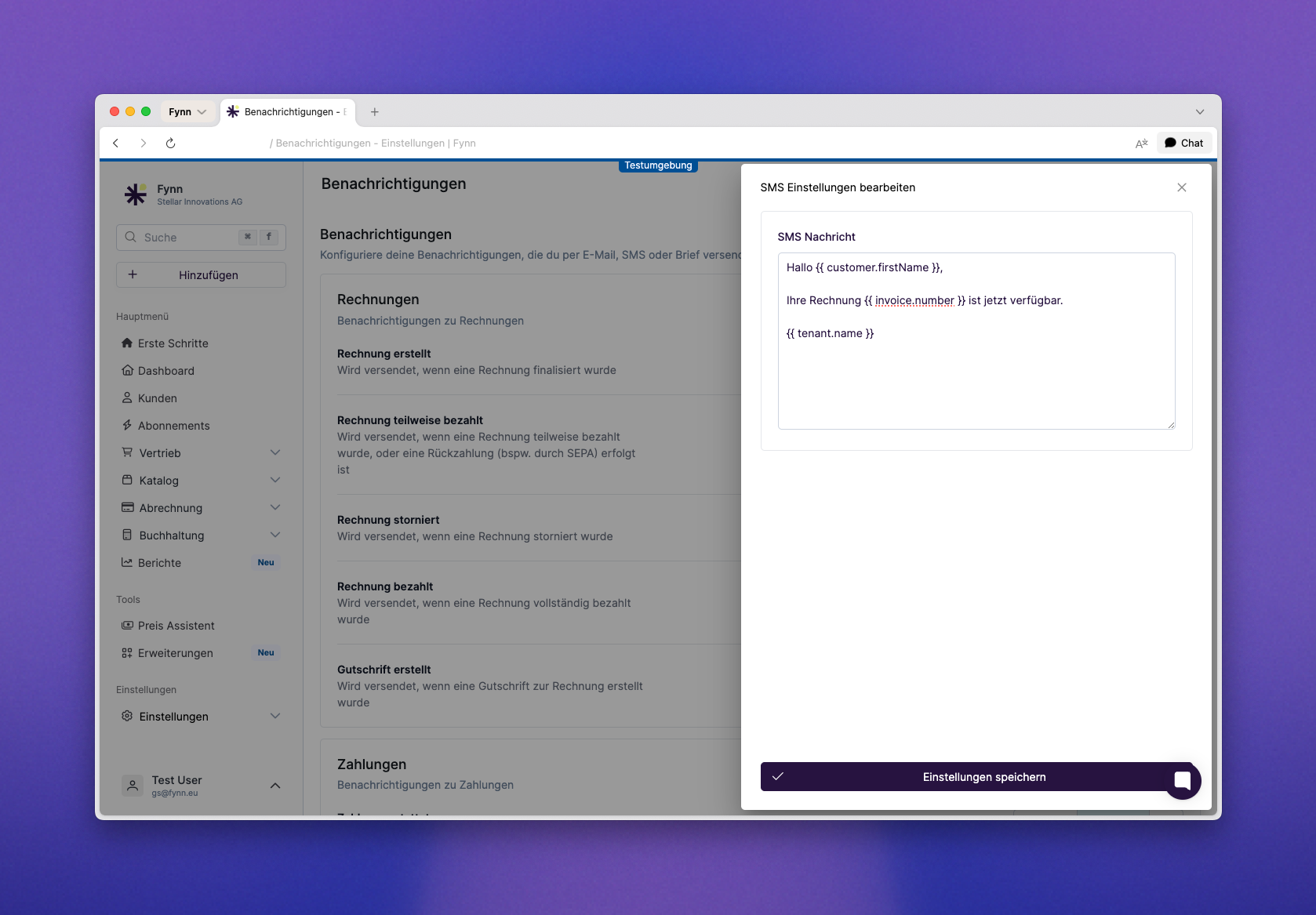
The SMS format is a simple text that is sent to users. You can customize the templates to change the style and content of the SMS sent to your users.Clicking “Save Settings” saves the SMS template or changes.
To use this feature, it must be activated by our team. Send us a short email with your request to hi@fynn.eu
Fynn offers the option to send notifications by letter. This feature is particularly useful for important communications that cannot or should not be delivered electronically.Letters received by 2 PM are printed and sent the same day. Letters created after 2 PM are printed and sent the next business day.
To use this feature, it must be activated by our team. Send us a short email with your request to hi@fynn.eu
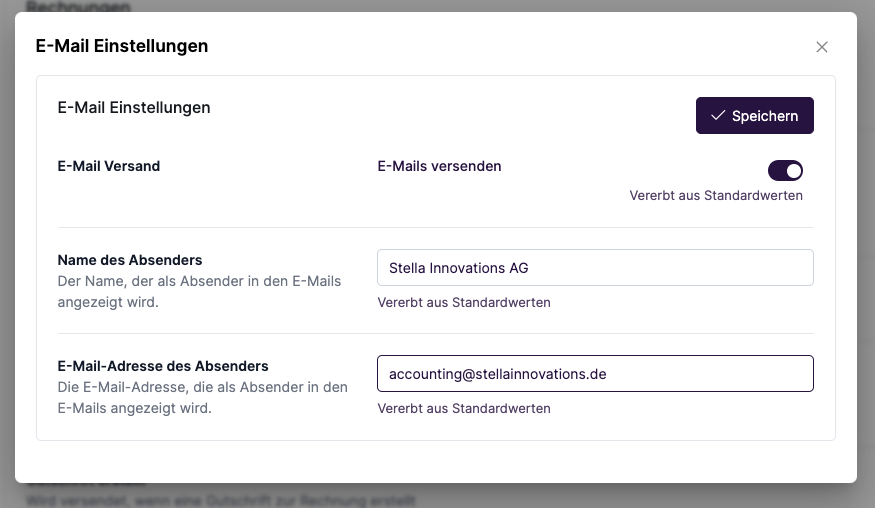
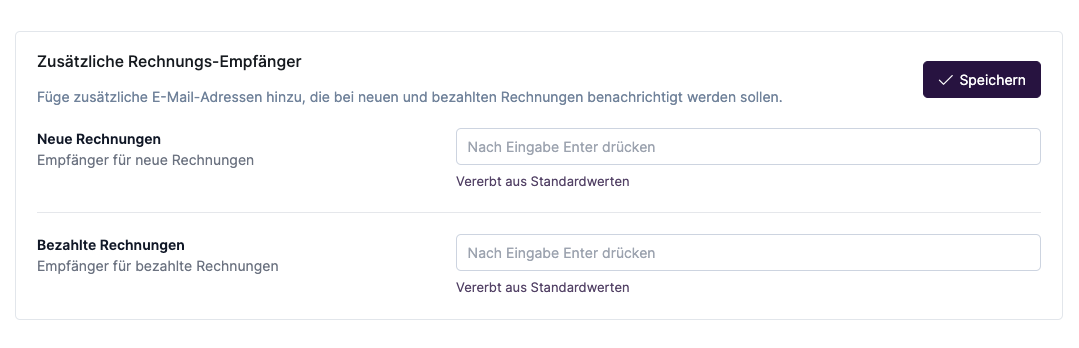
The “Additional Invoice Recipients” feature allows you to send invoices directly via email upload to your accounting system, for example. The sender email address used is the one stored in the organization settings. This may need to be approved in advance in your accounting software.The customer still receives a separate email with the invoice. Additional recipients also receive the invoice, but without the indication that it is a copy.
Was this page helpful?
{"docsConfig":{"theme":"mint","$schema":"https://mintlify.com/docs.json","name":"Fynn Docs","colors":{"primary":"#000","light":"#fff","dark":"#000"},"logo":{"light":"https://mintcdn.com/fynnsubscriptionbilling/kPbBeWVEZfmEic9q/logo/logo-dark.svg?fit=max\u0026auto=format\u0026n=kPbBeWVEZfmEic9q\u0026q=85\u0026s=83e4b30a53d77c3809e0f22afa29335d","dark":"https://mintcdn.com/fynnsubscriptionbilling/kPbBeWVEZfmEic9q/logo/dark.svg?fit=max\u0026auto=format\u0026n=kPbBeWVEZfmEic9q\u0026q=85\u0026s=5798319f6c8632d79fe789f72eaa94e2"},"favicon":"https://mintcdn.com/fynnsubscriptionbilling/zDQkHT5wBBQ3jA-O/favicon.svg?fit=max\u0026auto=format\u0026n=zDQkHT5wBBQ3jA-O\u0026q=85\u0026s=410ff1f698a399faed9fbb877457bb43","api":{"openapi":["assets/openapi.json","assets/openapi-v2-plans.json","assets/openapi-v2-offers.json","assets/openapi-v2-commission.json","assets/openapi-v2-payment-plans.json","assets/openapi-v2-finance.json"],"playground":{"display":"interactive"},"examples":{"languages":["curl","python","javascript","php"]}},"navbar":{"links":[{"href":"https://cal.com/team/fynn/fynn-documentation","label":"Termin buchen"},{"href":"mailto:hi@fynn.eu","label":"Support"}],"primary":{"type":"button","label":"App Login","href":"https://app.fynn.eu"}},"footer":{"socials":{"x":"https://twitter.com/wearefynn","github":"https://github.com/fynn-digital","linkedin":"https://www.linkedin.com/company/wearefynn"}},"integrations":{"gtm":{"tagId":"GTM-NKGQ4TQ9"}},"contextual":{"options":["copy","view","chatgpt","claude"],"display":"header"},"styling":{"latex":true},"navigation":{"languages":[{"language":"de","default":true,"href":"introduction"},{"language":"en","href":"en/introduction"}]}},"deployment":{"deploymentMetadataValue":{"subdomain":"fynnsubscriptionbilling","hasAudioNarration":false,"actualSubdomain":"fynnsubscriptionbilling","customDomains":["docs.fynn.eu"],"gitSource":{"type":"gitlab","owner":"fynn/core","repo":"core-api23","deployBranch":"main","contentDirectory":"public-docs","isPrivate":true,"projectId":396,"hostUrl":"https://git.netzfabrik.com","mountPath":"","label":""},"chroma":{"liveDeploymentHistoryId":"6ade65cd8bc03ecc3442159a","collectionId":"e9321faf-f8cc-4122-a151-936be855b852","schemaVersion":"v3","latestBuiltDeploymentHistoryId":"6ade65cd8bc03ecc3442159a"},"feedback":{"thumbs":true,"edits":true,"issues":true,"agentFeedback":true},"entitlements":{"REMOVE_BRANDING":{"status":"ENABLED"}},"buildId":"6ade65cd8bc03ecc3442159a","clientVersion":"0.0.3966","searchFilterCounts":[{"language":"de","tag":"API Referenz","count":249},{"language":"de","tag":"Dokumentation","count":93},{"language":"de","tag":"API V2","count":71},{"language":"en","tag":"Documentation","count":59},{"language":"de","tag":"API","count":46},{"language":"de","tag":"Catalogue","count":42},{"language":"de","tag":"Angebote","count":36},{"language":"de","tag":"Subscription","count":30},{"language":"de","tag":"Customer","count":30},{"language":"de","tag":"Finanzberichte","count":29},{"language":"de","tag":"Payment","count":26},{"language":"default","tag":"API V2","count":18},{"language":"default","tag":"Dokumentation","count":15},{"language":"default","tag":"Pläne","count":15},{"language":"en","tag":"Integrations","count":15},{"language":"default","tag":"API","count":11},{"language":"default","tag":"API Referenz","count":10},{"language":"default","tag":"API documentation","count":10},{"language":"en","tag":"Products","count":9},{"language":"en","tag":"Settings","count":9},{"language":"en","tag":"Customers","count":7},{"language":"en","tag":"Subscriptions","count":7},{"language":"default","tag":"Guides","count":6},{"language":"default","tag":"Plan-Verwaltung","count":6},{"language":"en","tag":"Payment Providers","count":6},{"language":"default","tag":"Nutzungsbasierte Abrechnung","count":5},{"language":"en","tag":"Accounting","count":5},{"language":"en","tag":"Developers","count":5},{"language":"en","tag":"Invoices","count":5},{"language":"default","tag":"KI-Assistent","count":4}]},"assistantConfig":{},"hasChatPermissions":false,"hasWebMcpPermissions":false,"toggles":[{"name":"kill-isr","enabled":true,"variant":{"name":"disabled","enabled":false,"feature_enabled":true},"impressionData":false},{"name":"agent-mintlify-slack","enabled":true,"variant":{"name":"disabled","enabled":false,"feature_enabled":true},"impressionData":false},{"name":"editor-v7-file-tree","enabled":true,"variant":{"name":"disabled","enabled":false,"feature_enabled":true},"impressionData":false},{"name":"agent-integrations-settings","enabled":true,"variant":{"name":"disabled","enabled":false,"feature_enabled":true},"impressionData":false},{"name":"automations-pr-grouping","enabled":true,"variant":{"name":"disabled","enabled":false,"feature_enabled":true},"impressionData":false},{"name":"custom-prefix","enabled":true,"variant":{"name":"disabled","enabled":false,"feature_enabled":true},"impressionData":false},{"name":"analytics-v7","enabled":true,"variant":{"name":"disabled","enabled":false,"feature_enabled":true},"impressionData":false},{"name":"user-flows-analytics","enabled":true,"variant":{"name":"disabled","enabled":false,"feature_enabled":true},"impressionData":false},{"name":"no-publish-flow","enabled":true,"variant":{"name":"disabled","enabled":false,"feature_enabled":true},"impressionData":false},{"name":"workos-onboarding","enabled":true,"variant":{"name":"disabled","enabled":false,"feature_enabled":true},"impressionData":false},{"name":"llms-txt-v2","enabled":true,"variant":{"name":"disabled","enabled":false,"feature_enabled":true},"impressionData":false},{"name":"pause-universal-search-reconcile","enabled":true,"variant":{"name":"disabled","enabled":false,"feature_enabled":true},"impressionData":false},{"name":"snapshot-serving-live","enabled":true,"variant":{"name":"disabled","enabled":false,"feature_enabled":true},"impressionData":false},{"name":"stripTemperatureMiddleware","enabled":true,"variant":{"name":"disabled","enabled":false,"feature_enabled":true},"impressionData":false},{"name":"per-site-search-delta","enabled":true,"variant":{"name":"disabled","enabled":false,"feature_enabled":true},"impressionData":false},{"name":"support-platform-pylon-zendesk","enabled":true,"variant":{"name":"disabled","enabled":false,"feature_enabled":true},"impressionData":false},{"name":"snapshot-serving","enabled":true,"variant":{"name":"disabled","enabled":false,"feature_enabled":true},"impressionData":false},{"name":"instant-rollback","enabled":true,"variant":{"name":"disabled","enabled":false,"feature_enabled":true},"impressionData":false},{"name":"granular-notifications-server","enabled":true,"variant":{"name":"disabled","enabled":false,"feature_enabled":true},"impressionData":false},{"name":"granular-notifications","enabled":true,"variant":{"name":"disabled","enabled":false,"feature_enabled":true},"impressionData":false},{"name":"editor-private-page-search","enabled":true,"variant":{"name":"disabled","enabled":false,"feature_enabled":true},"impressionData":false},{"name":"automations-fable","enabled":true,"variant":{"name":"disabled","enabled":false,"feature_enabled":true},"impressionData":false},{"name":"fixed-ai-action-pricing","enabled":true,"variant":{"name":"disabled","enabled":false,"feature_enabled":true},"impressionData":false},{"name":"automation-resolve-merge-conflict","enabled":true,"variant":{"name":"disabled","enabled":false,"feature_enabled":true},"impressionData":false},{"name":"scoped-publishing","enabled":true,"variant":{"name":"disabled","enabled":false,"feature_enabled":true},"impressionData":false},{"name":"mintql","enabled":true,"variant":{"name":"disabled","enabled":false,"feature_enabled":true},"impressionData":false},{"name":"page-level-analytics","enabled":true,"variant":{"name":"disabled","enabled":false,"feature_enabled":true},"impressionData":false},{"name":"editor-version-history-v2","enabled":true,"variant":{"name":"disabled","enabled":false,"feature_enabled":true},"impressionData":false},{"name":"editor-nav-generations","enabled":true,"variant":{"name":"disabled","enabled":false,"feature_enabled":true},"impressionData":false},{"name":"billing-page-v2","enabled":true,"variant":{"name":"disabled","enabled":false,"feature_enabled":true},"impressionData":false},{"name":"workspace-projects","enabled":true,"variant":{"name":"disabled","enabled":false,"feature_enabled":true},"impressionData":false},{"name":"assistant-v5","enabled":true,"variant":{"name":"disabled","enabled":false,"feature_enabled":true},"impressionData":false},{"name":"byok-sep-25","enabled":true,"variant":{"name":"disabled","enabled":false,"feature_enabled":true},"impressionData":false},{"name":"fork-pr-previews","enabled":true,"variant":{"name":"disabled","enabled":false,"feature_enabled":true},"impressionData":false},{"name":"revalidation-jwt","enabled":true,"variant":{"name":"disabled","enabled":false,"feature_enabled":true},"impressionData":false},{"name":"vite-origin","enabled":true,"variant":{"name":"disabled","enabled":false,"feature_enabled":true},"impressionData":false},{"name":"editor-agent-model-picker","enabled":true,"variant":{"name":"disabled","enabled":false,"feature_enabled":true},"impressionData":false},{"name":"billing-updated-9-15","enabled":true,"variant":{"name":"disabled","enabled":false,"feature_enabled":true},"impressionData":false},{"name":"hobby-abuse-scan","enabled":true,"variant":{"name":"disabled","enabled":false,"feature_enabled":true},"impressionData":false},{"name":"dashboard-inbox","enabled":true,"variant":{"name":"disabled","enabled":false,"feature_enabled":true},"impressionData":false}],"isAtlas":false,"googleFontsInlined":false},"customCss":[{"filePath":"style.css","content":".update-container{display:flex}.update-container>div{position:unset!important}@media (min-width:1024px){.update-container{flex-direction:column!important}}[data-component-part=update-label]{background:0 0}[data-component-part=update-tag]{-webkit-text-size-adjust:100%;tab-size:4;font-variation-settings:normal;-webkit-tap-highlight-color:transparent;font-feature-settings:\"cv02\",\"cv03\",\"cv04\",\"cv11\";--scroll-mt:9.5rem;--font-inter:'__Inter_86cd50', '__Inter_Fallback_86cd50';--font-jetbrains-mono:'__JetBrains_Mono_3c557b', '__JetBrains_Mono_Fallback_3c557b';--primary:39 19 64;--primary-light:255 255 255;--primary-dark:0 0 0;--background-light:255 255 255;--background-dark:0 0 0;--gray-50:244 243 244;--gray-100:239 238 239;--gray-200:223 223 224;--gray-300:207 206 207;--gray-400:159 159 160;--gray-500:113 112 113;--gray-600:81 80 81;--gray-700:63 63 64;--gray-800:38 37 39;--gray-900:23 23 24;--gray-950:11 10 12;font-family:Inter,ui-sans-serif,system-ui,-apple-system,BlinkMacSystemFont,\"Segoe UI\",Roboto,Helvetica,Arial,sans-serif,\"Apple Color Emoji\",\"Segoe UI Emoji\",\"Segoe UI Symbol\";-webkit-font-smoothing:antialiased;--tw-prose-body:#374151;--tw-prose-headings:#111827;--tw-prose-lead:#4b5563;--tw-prose-links:#111827;--tw-prose-bold:#111827;--tw-prose-counters:#6b7280;--tw-prose-bullets:#d1d5db;--tw-prose-hr:#e5e7eb;--tw-prose-quotes:#111827;--tw-prose-quote-borders:#e5e7eb;--tw-prose-captions:#6b7280;--tw-prose-kbd:#111827;--tw-prose-kbd-shadows:17 24 39;--tw-prose-code:#111827;--tw-prose-pre-code:#e5e7eb;--tw-prose-pre-bg:#1f2937;--tw-prose-th-borders:#d1d5db;--tw-prose-td-borders:#e5e7eb;--tw-prose-invert-body:#d1d5db;--tw-prose-invert-headings:#fff;--tw-prose-invert-lead:#9ca3af;--tw-prose-invert-links:#fff;--tw-prose-invert-bold:#fff;--tw-prose-invert-counters:#9ca3af;--tw-prose-invert-bullets:#4b5563;--tw-prose-invert-hr:#374151;--tw-prose-invert-quotes:#f3f4f6;--tw-prose-invert-quote-borders:#374151;--tw-prose-invert-captions:#9ca3af;--tw-prose-invert-kbd:#fff;--tw-prose-invert-kbd-shadows:255 255 255;--tw-prose-invert-code:#fff;--tw-prose-invert-pre-code:#d1d5db;--tw-prose-invert-pre-bg:rgba(0,0,0,.5);--tw-prose-invert-th-borders:#4b5563;--tw-prose-invert-td-borders:#374151;-webkit-user-modify:read-only;box-sizing:border-box;border-width:0;border-style:solid;border-color:rgb(var(--gray-200));--tw-border-spacing-x:0;--tw-border-spacing-y:0;--tw-translate-x:0;--tw-translate-y:0;--tw-rotate:0;--tw-skew-x:0;--tw-skew-y:0;--tw-scale-x:1;--tw-scale-y:1;--tw-pan-x: ;--tw-pan-y: ;--tw-pinch-zoom: ;--tw-scroll-snap-strictness:proximity;--tw-gradient-from-position: ;--tw-gradient-via-position: ;--tw-gradient-to-position: ;--tw-ordinal: ;--tw-slashed-zero: ;--tw-numeric-figure: ;--tw-numeric-spacing: ;--tw-numeric-fraction: ;--tw-ring-inset: ;--tw-ring-offset-width:0px;--tw-ring-offset-color:#fff;--tw-ring-color:rgba(59,130,246,.5);--tw-ring-offset-shadow:0 0 #0000;--tw-ring-shadow:0 0 #0000;--tw-shadow:0 0 #0000;--tw-shadow-colored:0 0 #0000;--tw-blur: ;--tw-brightness: ;--tw-contrast: ;--tw-grayscale: ;--tw-hue-rotate: ;--tw-invert: ;--tw-saturate: ;--tw-sepia: ;--tw-drop-shadow: ;--tw-backdrop-blur: ;--tw-backdrop-brightness: ;--tw-backdrop-contrast: ;--tw-backdrop-grayscale: ;--tw-backdrop-hue-rotate: ;--tw-backdrop-invert: ;--tw-backdrop-opacity: ;--tw-backdrop-saturate: ;--tw-backdrop-sepia: ;--tw-contain-size: ;--tw-contain-layout: ;--tw-contain-paint: ;--tw-contain-style: ;display:flex;flex-grow:0;cursor:pointer;align-items:center;justify-content:center;border-radius:var(--rounded-lg,.5rem);background-color:rgb(var(--primary)/.1);padding:.25rem .5rem;font-size:.875rem;line-height:1.25rem;font-weight:500;--tw-text-opacity:1;color:rgb(var(--primary)/var(--tw-text-opacity))}"}],"page":{"pagePath":"en/guide/notifications/introduction","slug":"/en/guide/notifications/introduction","pageMetadata":{"title":"Notifications","description":"Configure notifications and emails.","href":"/en/guide/notifications/introduction"},"description":{"compiledSource":"\"use strict\";\nconst {jsx: _jsx} = arguments[0];\nconst {useMDXComponents: _provideComponents} = arguments[0];\nfunction _createMdxContent(props) {\n const _components = {\n p: \"p\",\n ..._provideComponents(),\n ...props.components\n };\n return _jsx(_components.p, {\n children: \"Configure notifications and emails.\"\n });\n}\nfunction MDXContent(props = {}) {\n const {wrapper: MDXLayout} = {\n ..._provideComponents(),\n ...props.components\n };\n return MDXLayout ? _jsx(MDXLayout, {\n ...props,\n children: _jsx(_createMdxContent, {\n ...props\n })\n }) : _createMdxContent(props);\n}\nreturn {\n default: MDXContent\n};\n","frontmatter":{},"scope":{}},"pageType":"default","mdx":{"mdxSource":{"compiledSource":"\"use strict\";const{Fragment:_Fragment,jsx:_jsx,jsxs:_jsxs}=arguments[0];const{useMDXComponents:_provideComponents}=arguments[0];function _createMdxContent(props){const _components={a:`a`,code:`code`,li:`li`,p:`p`,strong:`strong`,ul:`ul`,..._provideComponents(),...props.components},{Frame,Heading,Info,Note,OptimizedImage,Step,Steps,Tab,Tabs,Tip,Warning}=_components;if(!Frame)_missingMdxReference(`Frame`,true);if(!Heading)_missingMdxReference(`Heading`,true);if(!Info)_missingMdxReference(`Info`,true);if(!Note)_missingMdxReference(`Note`,true);if(!OptimizedImage)_missingMdxReference(`OptimizedImage`,true);if(!Step)_missingMdxReference(`Step`,true);if(!Steps)_missingMdxReference(`Steps`,true);if(!Tab)_missingMdxReference(`Tab`,true);if(!Tabs)_missingMdxReference(`Tabs`,true);if(!Tip)_missingMdxReference(`Tip`,true);if(!Warning)_missingMdxReference(`Warning`,true);return _jsxs(_Fragment,{children:[_jsx(Frame,{children:_jsx(OptimizedImage,{src:`https://mintcdn.com/fynnsubscriptionbilling/1WHsrw9xV98b8NDj/images/fynn-eu-settings-notifications.png?fit=max\u0026auto=format\u0026n=1WHsrw9xV98b8NDj\u0026q=85\u0026s=88e9982931ecfe08c93419f5c00afe0c`,alt:`Notification settings`,\"data-og-width\":`1678`,width:`1678`,\"data-og-height\":`1167`,height:`1167`,\"data-path\":`images/fynn-eu-settings-notifications.png`,\"data-optimize\":`true`,\"data-opv\":`3`,srcset:`https://mintcdn.com/fynnsubscriptionbilling/1WHsrw9xV98b8NDj/images/fynn-eu-settings-notifications.png?w=280\u0026fit=max\u0026auto=format\u0026n=1WHsrw9xV98b8NDj\u0026q=85\u0026s=27a1b823e584ce3323fc9076d77c23ec 280w, https://mintcdn.com/fynnsubscriptionbilling/1WHsrw9xV98b8NDj/images/fynn-eu-settings-notifications.png?w=560\u0026fit=max\u0026auto=format\u0026n=1WHsrw9xV98b8NDj\u0026q=85\u0026s=8581125cd7aa4c37980cea8abf763c20 560w, https://mintcdn.com/fynnsubscriptionbilling/1WHsrw9xV98b8NDj/images/fynn-eu-settings-notifications.png?w=840\u0026fit=max\u0026auto=format\u0026n=1WHsrw9xV98b8NDj\u0026q=85\u0026s=9fe85f4ce44dc55073e3606ca9c00fd5 840w, https://mintcdn.com/fynnsubscriptionbilling/1WHsrw9xV98b8NDj/images/fynn-eu-settings-notifications.png?w=1100\u0026fit=max\u0026auto=format\u0026n=1WHsrw9xV98b8NDj\u0026q=85\u0026s=e7abcc70b057df930fb280f080531d48 1100w, https://mintcdn.com/fynnsubscriptionbilling/1WHsrw9xV98b8NDj/images/fynn-eu-settings-notifications.png?w=1650\u0026fit=max\u0026auto=format\u0026n=1WHsrw9xV98b8NDj\u0026q=85\u0026s=c8fbd09ca9e409f82c1174fa2d84a99e 1650w, https://mintcdn.com/fynnsubscriptionbilling/1WHsrw9xV98b8NDj/images/fynn-eu-settings-notifications.png?w=2500\u0026fit=max\u0026auto=format\u0026n=1WHsrw9xV98b8NDj\u0026q=85\u0026s=1fcef580a7826003bdbf207783156b6d 2500w`})}),`\n`,_jsx(_components.p,{children:`Fynn offers a variety of notifications that you can customize to be informed about important events in your organization. These notifications can be sent via email or through other channels.`}),`\n`,_jsx(Heading,{level:`2`,id:`multilingual-email-notifications`,children:`Multilingual Email Notifications`}),`\n`,_jsx(Info,{children:_jsxs(_components.p,{children:[`Email notifications are available in `,_jsx(_components.strong,{children:`German and English`}),`. The language is automatically determined based on the customer profile.`]})}),`\n`,_jsx(_components.p,{children:`Fynn supports multilingual email templates. Each notification can have a separate German and English template, which are edited and versioned independently.`}),`\n`,_jsx(_components.p,{children:_jsx(_components.strong,{children:`How it works:`})}),`\n`,_jsxs(_components.ul,{children:[`\n`,_jsx(_components.li,{children:`Customers automatically receive emails in the language configured in their profile (“Language” field)`}),`\n`,_jsxs(_components.li,{children:[`In the template editor, switch between the German and English versions using `,_jsx(_components.strong,{children:`language tabs`})]}),`\n`,_jsxs(_components.li,{children:[`Use the built-in `,_jsx(_components.strong,{children:`AI translation`}),` to translate the German template to English with a single click`]}),`\n`,_jsx(_components.li,{children:`Review and edit the generated translation before saving`}),`\n`,_jsxs(_components.li,{children:[_jsx(_components.strong,{children:`Global email headers and footers`}),` can also be configured per language`]}),`\n`,_jsx(_components.li,{children:`System texts (e.g. “Managing Director”, “Open email in browser”) are automatically displayed in the customer’s language`}),`\n`]}),`\n`,_jsx(Tip,{children:_jsx(_components.p,{children:`If no English template is configured for a notification, the German version is used automatically. You can add English templates gradually.`})}),`\n`,_jsx(Heading,{level:`2`,id:`configure-notifications`,children:`Configure Notifications`}),`\n`,_jsxs(_components.p,{children:[`To configure notifications, go to `,_jsx(_components.a,{href:`https://app.fynn.eu/settings/notifications`,children:`Settings > Notifications`}),`. Here you can view and customize the various available notifications.`]}),`\n`,_jsx(_components.p,{children:`For each notification, you can specify whether it is enabled and which template is used.`}),`\n`,_jsxs(Tabs,{children:[_jsxs(Tab,{title:`Email Notifications`,id:`email-notifications`,\"data-child-heading-ids\":`[\"customize-notifications\",\"variables-in-email-templates\",\"custom-email-sender\"]`,children:[_jsx(Heading,{level:`3`,id:`customize-notifications`,children:`Customize Notifications`}),_jsx(Frame,{children:_jsx(OptimizedImage,{src:`https://mintcdn.com/fynnsubscriptionbilling/1WHsrw9xV98b8NDj/images/fynn-eu-settings-notifications-edit-mail-templates.png?fit=max\u0026auto=format\u0026n=1WHsrw9xV98b8NDj\u0026q=85\u0026s=afd231b994be5ca7396d00fe7f4e9950`,alt:`Notification settings`,\"data-og-width\":`1678`,width:`1678`,\"data-og-height\":`1167`,height:`1167`,\"data-path\":`images/fynn-eu-settings-notifications-edit-mail-templates.png`,\"data-optimize\":`true`,\"data-opv\":`3`,srcset:`https://mintcdn.com/fynnsubscriptionbilling/1WHsrw9xV98b8NDj/images/fynn-eu-settings-notifications-edit-mail-templates.png?w=280\u0026fit=max\u0026auto=format\u0026n=1WHsrw9xV98b8NDj\u0026q=85\u0026s=ff43d9a30f719d69c91086315e621eb7 280w, https://mintcdn.com/fynnsubscriptionbilling/1WHsrw9xV98b8NDj/images/fynn-eu-settings-notifications-edit-mail-templates.png?w=560\u0026fit=max\u0026auto=format\u0026n=1WHsrw9xV98b8NDj\u0026q=85\u0026s=3d56d0fc551e989bb67e921b4787cfb7 560w, https://mintcdn.com/fynnsubscriptionbilling/1WHsrw9xV98b8NDj/images/fynn-eu-settings-notifications-edit-mail-templates.png?w=840\u0026fit=max\u0026auto=format\u0026n=1WHsrw9xV98b8NDj\u0026q=85\u0026s=332a38992ba77e91920b53860c1bf63f 840w, https://mintcdn.com/fynnsubscriptionbilling/1WHsrw9xV98b8NDj/images/fynn-eu-settings-notifications-edit-mail-templates.png?w=1100\u0026fit=max\u0026auto=format\u0026n=1WHsrw9xV98b8NDj\u0026q=85\u0026s=8bd8d60eaf1a989a525bafdf746f9057 1100w, https://mintcdn.com/fynnsubscriptionbilling/1WHsrw9xV98b8NDj/images/fynn-eu-settings-notifications-edit-mail-templates.png?w=1650\u0026fit=max\u0026auto=format\u0026n=1WHsrw9xV98b8NDj\u0026q=85\u0026s=1b0cfd4c058b440867f55da9ade752d4 1650w, https://mintcdn.com/fynnsubscriptionbilling/1WHsrw9xV98b8NDj/images/fynn-eu-settings-notifications-edit-mail-templates.png?w=2500\u0026fit=max\u0026auto=format\u0026n=1WHsrw9xV98b8NDj\u0026q=85\u0026s=c3354a7cce912203230dcf238c5f62ae 2500w`})}),_jsx(_components.p,{children:`Email templates are written in MJML format, which provides an easy way to create responsive emails. You can customize the templates to change the style and content of the emails sent to your users.`}),_jsxs(_components.p,{children:[`The templates contain placeholders that are automatically replaced with the corresponding information when the email is sent. These placeholders are enclosed in curly braces, e.g., `,_jsx(_components.code,{children:`{{ invoice.number }}`}),` for the invoice number.`]}),_jsx(_components.p,{children:`An exact list of available placeholders is currently not available, but you can customize and test the templates directly in the Fynn app.`}),_jsx(Heading,{level:`3`,id:`variables-in-email-templates`,children:`Variables in Email Templates`}),_jsx(Heading,{level:`2`,id:`custom-email-sender`,children:`Custom Email Sender`}),_jsxs(Note,{children:[`To send emails with your own domain, the domain must be configured by the Fynn team. Send us a short email with your request to `,_jsx(_components.a,{href:`mailto:hi@fynn.eu`,children:`hi@fynn.eu`}),`.`]}),_jsxs(Steps,{children:[_jsx(Step,{title:`Open Settings`,children:_jsxs(_components.p,{children:[`Go to `,_jsx(_components.a,{href:`https://app.fynn.eu/settings/notifications`,children:`Settings > Notifications`})]})}),_jsx(Step,{title:`Click the \"Configure Email Sender\" button`}),_jsx(Step,{title:`Set the Customer Sender Name`,children:_jsx(Frame,{children:_jsx(OptimizedImage,{src:`https://mintcdn.com/fynnsubscriptionbilling/1WHsrw9xV98b8NDj/images/fynn-eu-customer-sender-name.png?fit=max\u0026auto=format\u0026n=1WHsrw9xV98b8NDj\u0026q=85\u0026s=b6fbfd2105370e56223a3c395d3b98f2`,alt:`Fynn custom domain as sender`,\"data-og-width\":`875`,width:`875`,\"data-og-height\":`508`,height:`508`,\"data-path\":`images/fynn-eu-customer-sender-name.png`,\"data-optimize\":`true`,\"data-opv\":`3`,srcset:`https://mintcdn.com/fynnsubscriptionbilling/1WHsrw9xV98b8NDj/images/fynn-eu-customer-sender-name.png?w=280\u0026fit=max\u0026auto=format\u0026n=1WHsrw9xV98b8NDj\u0026q=85\u0026s=f3d717bbb685ef78bc5336f45668c0e2 280w, https://mintcdn.com/fynnsubscriptionbilling/1WHsrw9xV98b8NDj/images/fynn-eu-customer-sender-name.png?w=560\u0026fit=max\u0026auto=format\u0026n=1WHsrw9xV98b8NDj\u0026q=85\u0026s=41faa0403b4a80de7d0c042cfe3ba559 560w, https://mintcdn.com/fynnsubscriptionbilling/1WHsrw9xV98b8NDj/images/fynn-eu-customer-sender-name.png?w=840\u0026fit=max\u0026auto=format\u0026n=1WHsrw9xV98b8NDj\u0026q=85\u0026s=b28731efdb685131e190db08fb575fa3 840w, https://mintcdn.com/fynnsubscriptionbilling/1WHsrw9xV98b8NDj/images/fynn-eu-customer-sender-name.png?w=1100\u0026fit=max\u0026auto=format\u0026n=1WHsrw9xV98b8NDj\u0026q=85\u0026s=42629d06775243680d59300ed8a3a587 1100w, https://mintcdn.com/fynnsubscriptionbilling/1WHsrw9xV98b8NDj/images/fynn-eu-customer-sender-name.png?w=1650\u0026fit=max\u0026auto=format\u0026n=1WHsrw9xV98b8NDj\u0026q=85\u0026s=551269a4c315ea757a4435f6b60e813b 1650w, https://mintcdn.com/fynnsubscriptionbilling/1WHsrw9xV98b8NDj/images/fynn-eu-customer-sender-name.png?w=2500\u0026fit=max\u0026auto=format\u0026n=1WHsrw9xV98b8NDj\u0026q=85\u0026s=b5741139ba6152020b2bc2027b103dc6 2500w`})})}),_jsx(Step,{title:`Click Save`})]})]}),_jsxs(Tab,{title:`SMS Notifications`,id:`sms-notifications`,\"data-child-heading-ids\":`[\"customize-notifications-2\"]`,children:[_jsx(Warning,{children:_jsx(_components.p,{children:`SMS sending is a paid feature, each SMS (160 characters) costs 0.10 EUR (plus VAT).`})}),_jsx(Heading,{level:`3`,id:`customize-notifications-2`,children:`Customize Notifications`}),_jsx(Frame,{children:_jsx(OptimizedImage,{src:`https://mintcdn.com/fynnsubscriptionbilling/1WHsrw9xV98b8NDj/images/fynn-eu-notifications-sms.png?fit=max\u0026auto=format\u0026n=1WHsrw9xV98b8NDj\u0026q=85\u0026s=2cf3999c76a05a65a45e93d005f02678`,alt:`SMS notification settings`,\"data-og-width\":`1678`,width:`1678`,\"data-og-height\":`1167`,height:`1167`,\"data-path\":`images/fynn-eu-notifications-sms.png`,\"data-optimize\":`true`,\"data-opv\":`3`,srcset:`https://mintcdn.com/fynnsubscriptionbilling/1WHsrw9xV98b8NDj/images/fynn-eu-notifications-sms.png?w=280\u0026fit=max\u0026auto=format\u0026n=1WHsrw9xV98b8NDj\u0026q=85\u0026s=0bdd2db9582f2d875954d1786ced3be8 280w, https://mintcdn.com/fynnsubscriptionbilling/1WHsrw9xV98b8NDj/images/fynn-eu-notifications-sms.png?w=560\u0026fit=max\u0026auto=format\u0026n=1WHsrw9xV98b8NDj\u0026q=85\u0026s=1c73a260d31fd48689820417eb48bd8d 560w, https://mintcdn.com/fynnsubscriptionbilling/1WHsrw9xV98b8NDj/images/fynn-eu-notifications-sms.png?w=840\u0026fit=max\u0026auto=format\u0026n=1WHsrw9xV98b8NDj\u0026q=85\u0026s=051ce7cc2b89e311a1b50a3cc48e8efe 840w, https://mintcdn.com/fynnsubscriptionbilling/1WHsrw9xV98b8NDj/images/fynn-eu-notifications-sms.png?w=1100\u0026fit=max\u0026auto=format\u0026n=1WHsrw9xV98b8NDj\u0026q=85\u0026s=7ab7529498167eb58795e63816d52619 1100w, https://mintcdn.com/fynnsubscriptionbilling/1WHsrw9xV98b8NDj/images/fynn-eu-notifications-sms.png?w=1650\u0026fit=max\u0026auto=format\u0026n=1WHsrw9xV98b8NDj\u0026q=85\u0026s=61971f9bdf9e06dd15e92ffdbf439588 1650w, https://mintcdn.com/fynnsubscriptionbilling/1WHsrw9xV98b8NDj/images/fynn-eu-notifications-sms.png?w=2500\u0026fit=max\u0026auto=format\u0026n=1WHsrw9xV98b8NDj\u0026q=85\u0026s=33b900831625c04f550f63106d7d70eb 2500w`})}),_jsx(_components.p,{children:`The SMS format is a simple text that is sent to users. You can customize the templates to change the style and content of the SMS sent to your users.`}),_jsx(_components.p,{children:`Clicking “Save Settings” saves the SMS template or changes.`})]}),_jsxs(Tab,{title:`Letter Sending`,id:`letter-sending`,children:[_jsx(Warning,{children:_jsxs(_components.p,{children:[`To use this feature, it must be activated by our team. Send us a short email with your request to `,_jsx(_components.a,{href:`mailto:hi@fynn.eu`,children:`hi@fynn.eu`})]})}),_jsx(_components.p,{children:`Fynn offers the option to send notifications by letter. This feature is particularly useful for important communications that cannot or should not be delivered electronically.`}),_jsx(_components.p,{children:`Letters received by 2 PM are printed and sent the same day. Letters created after 2 PM are printed and sent the next business day.`})]})]}),`\n`,_jsx(Heading,{level:`2`,id:`additional-invoice-recipients`,children:`Additional Invoice Recipients`}),`\n`,_jsx(Warning,{children:_jsxs(_components.p,{children:[`To use this feature, it must be activated by our team. Send us a short email with your request to `,_jsx(_components.a,{href:`mailto:hi@fynn.eu`,children:`hi@fynn.eu`})]})}),`\n`,_jsx(Frame,{children:_jsx(OptimizedImage,{src:`https://mintcdn.com/fynnsubscriptionbilling/1WHsrw9xV98b8NDj/images/fynn-eu-settings-notifications-additional-recipients.png?fit=max\u0026auto=format\u0026n=1WHsrw9xV98b8NDj\u0026q=85\u0026s=333241d0553388cfe18a5df6f49c9f0f`,alt:`Additional invoice recipients`,\"data-og-width\":`1079`,width:`1079`,\"data-og-height\":`348`,height:`348`,\"data-path\":`images/fynn-eu-settings-notifications-additional-recipients.png`,\"data-optimize\":`true`,\"data-opv\":`3`,srcset:`https://mintcdn.com/fynnsubscriptionbilling/1WHsrw9xV98b8NDj/images/fynn-eu-settings-notifications-additional-recipients.png?w=280\u0026fit=max\u0026auto=format\u0026n=1WHsrw9xV98b8NDj\u0026q=85\u0026s=562f59f30e187c77d022df54fb9497b7 280w, https://mintcdn.com/fynnsubscriptionbilling/1WHsrw9xV98b8NDj/images/fynn-eu-settings-notifications-additional-recipients.png?w=560\u0026fit=max\u0026auto=format\u0026n=1WHsrw9xV98b8NDj\u0026q=85\u0026s=4d6d8aec969723c0e3453e08179b39b5 560w, https://mintcdn.com/fynnsubscriptionbilling/1WHsrw9xV98b8NDj/images/fynn-eu-settings-notifications-additional-recipients.png?w=840\u0026fit=max\u0026auto=format\u0026n=1WHsrw9xV98b8NDj\u0026q=85\u0026s=d636759e002b7ee34cb34175276e1e38 840w, https://mintcdn.com/fynnsubscriptionbilling/1WHsrw9xV98b8NDj/images/fynn-eu-settings-notifications-additional-recipients.png?w=1100\u0026fit=max\u0026auto=format\u0026n=1WHsrw9xV98b8NDj\u0026q=85\u0026s=4017690712ce35fe9c179c7fd09f24c0 1100w, https://mintcdn.com/fynnsubscriptionbilling/1WHsrw9xV98b8NDj/images/fynn-eu-settings-notifications-additional-recipients.png?w=1650\u0026fit=max\u0026auto=format\u0026n=1WHsrw9xV98b8NDj\u0026q=85\u0026s=3b6f54e116d8a427c136f85e7c050dfa 1650w, https://mintcdn.com/fynnsubscriptionbilling/1WHsrw9xV98b8NDj/images/fynn-eu-settings-notifications-additional-recipients.png?w=2500\u0026fit=max\u0026auto=format\u0026n=1WHsrw9xV98b8NDj\u0026q=85\u0026s=ed58595336895487e29ab34a032dc251 2500w`})}),`\n`,_jsx(_components.p,{children:`The “Additional Invoice Recipients” feature allows you to send invoices directly via email upload to your accounting system, for example. The sender email address used is the one stored in the organization settings. This may need to be approved in advance in your accounting software.`}),`\n`,_jsx(_components.p,{children:`The customer still receives a separate email with the invoice. Additional recipients also receive the invoice, but without the indication that it is a copy.`})]})}function MDXContent(props={}){const{wrapper:MDXLayout}={..._provideComponents(),...props.components};return MDXLayout?_jsx(MDXLayout,{...props,children:_jsx(_createMdxContent,{...props})}):_createMdxContent(props)}return{default:MDXContent};function _missingMdxReference(id,component){throw new Error(`Expected `+(component?`component`:`object`)+\" `\"+id+\"` to be defined: you likely forgot to import, pass, or provide it.\")}","frontmatter":{},"scope":{"config":{},"pageMetadata":{"title":"Notifications","description":"Configure notifications and emails.","href":"/en/guide/notifications/introduction"}}},"mdxSourceWithNoJs":null},"mdxExtracts":{"tableOfContents":[{"title":"Multilingual Email Notifications","slug":"multilingual-email-notifications","depth":2,"children":[]},{"title":"Configure Notifications","slug":"configure-notifications","depth":2,"children":[{"title":"Customize Notifications","slug":"customize-notifications","depth":3,"children":[],"tabId":"email-notifications"},{"title":"Variables in Email Templates","slug":"variables-in-email-templates","depth":3,"children":[],"tabId":"email-notifications"}]},{"title":"Custom Email Sender","slug":"custom-email-sender","depth":2,"children":[],"tabId":"email-notifications"},{"title":"Customize Notifications","slug":"customize-notifications-2","depth":3,"children":[],"tabId":"sms-notifications"},{"title":"Additional Invoice Recipients","slug":"additional-invoice-recipients","depth":2,"children":[]}],"codeExamples":{}},"jsLinks":["/_mintlify/custom/fynnsubscriptionbilling/086131e1768d5953/changelog-sidebar.js"],"subdomain":"fynnsubscriptionbilling","siteName":"Fynn Docs","title":"Notifications - Fynn Docs","navMaps":{"firstHrefInVersion":{},"firstHrefInLanguage":{"de":{"href":"/guide/notifications/introduction","matchLevel":1},"en":{"href":"/en/guide/notifications/introduction","matchLevel":0}}},"lastModified":"2026-02-23T18:34:31.587Z","originalFileLocation":"en/guide/notifications/introduction.mdx","locale":"en"},"headHtml":"\u003cscript data-mint-head>(function(){var d=document.documentElement,p=null;if(!p){try{p=localStorage.getItem(\"isDarkMode\")}catch(e){}if(p==='true')p='dark';else if(p==='false')p='light';if(p!=='light'\u0026\u0026p!=='dark'\u0026\u0026p!=='system')p=\"system\"}var r=p==='system'?(matchMedia(\"(prefers-color-scheme: dark)\").matches?'dark':'light'):p;d.classList.remove(r==='dark'?'light':'dark');d.classList.add(r);d.setAttribute(\"data-theme-preference\",p)})();\u003c/script>\u003cmeta data-mint-head name=\"description\" content=\"Configure notifications and emails.\">\u003cmeta data-mint-head name=\"application-name\" content=\"Fynn Docs\">\u003cmeta data-mint-head name=\"generator\" content=\"Mintlify\">\u003clink data-mint-head rel=\"icon\" type=\"image/png\" sizes=\"192x192\" href=\"/mintlify-assets/_mintlify/favicons/fynnsubscriptionbilling/aEyoysRsbJwnVfa3/_generated/favicon/android-chrome-192x192.png\" media=\"(prefers-color-scheme: light)\">\u003clink data-mint-head rel=\"apple-touch-icon\" type=\"image/png\" sizes=\"180x180\" href=\"/mintlify-assets/_mintlify/favicons/fynnsubscriptionbilling/aEyoysRsbJwnVfa3/_generated/favicon/apple-touch-icon.png\">\u003clink data-mint-head rel=\"icon\" type=\"image/png\" sizes=\"16x16\" href=\"/mintlify-assets/_mintlify/favicons/fynnsubscriptionbilling/aEyoysRsbJwnVfa3/_generated/favicon/favicon-16x16.png\" media=\"(prefers-color-scheme: light)\">\u003clink data-mint-head rel=\"icon\" type=\"image/png\" sizes=\"32x32\" href=\"/mintlify-assets/_mintlify/favicons/fynnsubscriptionbilling/aEyoysRsbJwnVfa3/_generated/favicon/favicon-32x32.png\" media=\"(prefers-color-scheme: light)\">\u003clink data-mint-head rel=\"shortcut icon\" type=\"image/x-icon\" href=\"/mintlify-assets/_mintlify/favicons/fynnsubscriptionbilling/aEyoysRsbJwnVfa3/_generated/favicon/favicon.ico\" media=\"(prefers-color-scheme: light)\">\u003clink data-mint-head rel=\"icon\" type=\"image/png\" sizes=\"192x192\" href=\"/mintlify-assets/_mintlify/favicons/fynnsubscriptionbilling/aEyoysRsbJwnVfa3/_generated/favicon-dark/android-chrome-192x192.png\" media=\"(prefers-color-scheme: dark)\">\u003clink data-mint-head rel=\"icon\" type=\"image/png\" sizes=\"16x16\" href=\"/mintlify-assets/_mintlify/favicons/fynnsubscriptionbilling/aEyoysRsbJwnVfa3/_generated/favicon-dark/favicon-16x16.png\" media=\"(prefers-color-scheme: dark)\">\u003clink data-mint-head rel=\"icon\" type=\"image/png\" sizes=\"32x32\" href=\"/mintlify-assets/_mintlify/favicons/fynnsubscriptionbilling/aEyoysRsbJwnVfa3/_generated/favicon-dark/favicon-32x32.png\" media=\"(prefers-color-scheme: dark)\">\u003clink data-mint-head rel=\"shortcut icon\" type=\"image/x-icon\" href=\"/mintlify-assets/_mintlify/favicons/fynnsubscriptionbilling/aEyoysRsbJwnVfa3/_generated/favicon-dark/favicon.ico\" media=\"(prefers-color-scheme: dark)\">\u003cmeta data-mint-head property=\"og:title\" content=\"Notifications - Fynn Docs\">\u003cmeta data-mint-head property=\"og:description\" content=\"Configure notifications and emails.\">\u003cmeta data-mint-head property=\"og:site_name\" content=\"Fynn Docs\">\u003cmeta data-mint-head property=\"og:url\" content=\"https://docs.fynn.eu/en/guide/notifications/introduction\">\u003cmeta data-mint-head property=\"og:type\" content=\"website\">\u003cmeta data-mint-head property=\"og:image\" content=\"https://fynnsubscriptionbilling.mintlify.app/_mintlify/api/og/v2?division=Notifications\u0026amp;title=Notifications\u0026amp;description=Configure+notifications+and+emails.\u0026amp;theme=4b76c1a49202070b198dd6e7\u0026amp;signature=91a0b42833e6a50d1d8121ee2cf8ce97e978461c926154a284094ae09b0a8ced\">\u003cmeta data-mint-head property=\"og:image:width\" content=\"1200\">\u003cmeta data-mint-head property=\"og:image:height\" content=\"630\">\u003cmeta data-mint-head name=\"twitter:card\" content=\"summary_large_image\">\u003cmeta data-mint-head name=\"twitter:title\" content=\"Notifications - Fynn Docs\">\u003cmeta data-mint-head name=\"twitter:description\" content=\"Configure notifications and emails.\">\u003cmeta data-mint-head name=\"twitter:image\" content=\"https://fynnsubscriptionbilling.mintlify.app/_mintlify/api/og/v2?division=Notifications\u0026amp;title=Notifications\u0026amp;description=Configure+notifications+and+emails.\u0026amp;theme=4b76c1a49202070b198dd6e7\u0026amp;signature=91a0b42833e6a50d1d8121ee2cf8ce97e978461c926154a284094ae09b0a8ced\">\u003cmeta data-mint-head name=\"twitter:image:width\" content=\"1200\">\u003cmeta data-mint-head name=\"twitter:image:height\" content=\"630\">\u003cmeta data-mint-head name=\"msapplication-config\" content=\"/mintlify-assets/_mintlify/favicons/fynnsubscriptionbilling/aEyoysRsbJwnVfa3/_generated/favicon/browserconfig.xml\">\u003cmeta data-mint-head name=\"apple-mobile-web-app-title\" content=\"Fynn Docs\">\u003cmeta data-mint-head name=\"msapplication-TileColor\" content=\"#000\">\u003clink data-mint-head rel=\"canonical\" href=\"https://docs.fynn.eu/en/guide/notifications/introduction\">\u003clink data-mint-head rel=\"alternate\" type=\"application/xml\" href=\"/sitemap.xml\">\u003clink data-mint-head rel=\"alternate\" type=\"text/markdown\" href=\"/en/guide/notifications/introduction.md\">\u003clink data-mint-head rel=\"alternate\" hreflang=\"en\" href=\"https://docs.fynn.eu/en/guide/notifications/introduction\">\u003clink data-mint-head rel=\"alternate\" hreflang=\"de\" href=\"https://docs.fynn.eu/guide/notifications/introduction\">\u003clink data-mint-head rel=\"alternate\" hreflang=\"x-default\" href=\"https://docs.fynn.eu/guide/notifications/introduction\">\u003cscript data-mint-head type=\"application/ld+json\">{\"@context\":\"https://schema.org\",\"@graph\":[{\"@type\":\"Organization\",\"@id\":\"https://docs.fynn.eu/#organization\",\"name\":\"Fynn Docs\",\"url\":\"https://docs.fynn.eu\",\"logo\":{\"@type\":\"ImageObject\",\"url\":\"https://mintcdn.com/fynnsubscriptionbilling/kPbBeWVEZfmEic9q/logo/logo-dark.svg?fit=max\u0026auto=format\u0026n=kPbBeWVEZfmEic9q\u0026q=85\u0026s=83e4b30a53d77c3809e0f22afa29335d\"}},{\"@type\":\"WebSite\",\"@id\":\"https://docs.fynn.eu#website\",\"name\":\"Fynn Docs\",\"url\":\"https://docs.fynn.eu\",\"publisher\":{\"@id\":\"https://docs.fynn.eu/#organization\"}},{\"@type\":\"WebPage\",\"@id\":\"https://docs.fynn.eu/en/guide/notifications/introduction#webpage\",\"url\":\"https://docs.fynn.eu/en/guide/notifications/introduction\",\"name\":\"Notifications\",\"description\":\"Configure notifications and emails.\",\"dateModified\":\"2026-02-23T18:34:31.587Z\",\"isPartOf\":{\"@id\":\"https://docs.fynn.eu#website\"},\"breadcrumb\":{\"@id\":\"https://docs.fynn.eu/en/guide/notifications/introduction#breadcrumb\"}},{\"@type\":\"BreadcrumbList\",\"@id\":\"https://docs.fynn.eu/en/guide/notifications/introduction#breadcrumb\",\"itemListElement\":[{\"@type\":\"ListItem\",\"position\":1,\"name\":\"Fynn Docs\",\"item\":\"https://docs.fynn.eu\"},{\"@type\":\"ListItem\",\"position\":2,\"name\":\"Notifications\",\"item\":\"https://docs.fynn.eu/en/guide/notifications/introduction\"}]},{\"@type\":[\"Article\",\"TechArticle\"],\"@id\":\"https://docs.fynn.eu/en/guide/notifications/introduction#article\",\"headline\":\"Notifications\",\"name\":\"Notifications\",\"description\":\"Configure notifications and emails.\",\"url\":\"https://docs.fynn.eu/en/guide/notifications/introduction\",\"mainEntityOfPage\":{\"@id\":\"https://docs.fynn.eu/en/guide/notifications/introduction#webpage\"},\"dateModified\":\"2026-02-23T18:34:31.587Z\",\"publisher\":{\"@id\":\"https://docs.fynn.eu/#organization\"},\"isPartOf\":{\"@id\":\"https://docs.fynn.eu#website\"}}]}\u003c/script>","siteName":"Fynn Docs","nav":{"global":null,"languages":[{"language":"de","default":true,"pages":[{"title":"de","href":"/guide/notifications/introduction"}]},{"language":"en","tabs":[{"tab":"Documentation","groups":[{"group":"Getting Started","icon":"rocket","pages":[{"title":"Welcome","icon":"hand-wave","href":"/en/introduction"},{"title":"Initial Configuration","icon":"rocket","href":"/en/guide/tenant/configure"},{"title":"Go-Live","icon":"flag-checkered","sidebarTitle":"Go-Live","href":"/guide/tenant/go-live-checklist"}]},{"group":"Customers","icon":"users","pages":[{"title":"Manage Customers","href":"/en/guide/customers/introduction"},{"title":"Customer Settings","sidebarTitle":"Settings","href":"/en/guide/customers/settings"},{"title":"Organization Hierarchy","sidebarTitle":"Organization Hierarchy","href":"/en/guide/customers/organization-hierarchy"},{"title":"Customer Portal","href":"/en/guide/customers/customer-portal"},{"title":"Manage Payment Methods","href":"/en/guide/payments/payment-methods"},{"title":"Customer Credit","href":"/en/guide/invoices/wallet-balance"},{"title":"Wallet top up","href":"/en/guide/invoices/wallet-top-up"},{"title":"Email Delivery and Status Tracking","href":"/en/guide/customers/email-tracking"}]},{"group":"Products","icon":"box","pages":[{"title":"Product Categories","href":"/en/guide/catalogue/product-categories"},{"title":"Products","href":"/en/guide/catalogue/products"},{"title":"Upgrades \u0026 Downgrades","sidebarTitle":"Upgrades \u0026 Downgrades","href":"/en/guide/catalogue/product-groups"},{"title":"Add-Ons","href":"/en/guide/catalogue/addons"},{"title":"Units","href":"/en/guide/catalogue/units"},{"title":"Prices","sidebarTitle":"Prices","href":"/en/guide/catalogue/prices/introduction"},{"title":"Preisberechnung","sidebarTitle":"Preisberechnung","href":"/guide/catalogue/prices/calculation"},{"title":"Preis-Assistent","sidebarTitle":"Preis-Assistent (KI)","icon":"wand-magic-sparkles","href":"/guide/catalogue/price-assistant"},{"title":"Vorausabrechnung vs. Nachgelagert","icon":"clock","sidebarTitle":"Abrechnungszeitpunkt","href":"/guide/catalogue/pricing-and-billing-timing"},{"title":"Coupons \u0026 Discounts","href":"/en/guide/discounts/introduction"},{"title":"Features","href":"/en/guide/entitlements/introduction"},{"title":"Checkout Link","href":"/en/guide/checkout/checkout-links"}]},{"group":"Usage-Based Billing","icon":"gauge","pages":[{"title":"Nutzungsbasierte Abrechnung","sidebarTitle":"Übersicht","href":"/guide/catalogue/measurements/introduction"},{"title":"Nutzungsmetriken","icon":"chart-line","sidebarTitle":"Nutzungsmetriken","href":"/guide/catalogue/measurements/billable-metrics"},{"title":"Nutzungsbasierte Abrechnung verstehen","href":"/guide/catalogue/measurements/usage-based-billing"},{"title":"Nutzungsereignisse senden","sidebarTitle":"Nutzungsereignisse","href":"/guide/catalogue/usage-events-import"},{"title":"Aggregationstypen","href":"/guide/catalogue/measurements/aggregation-types/overview"}]},{"group":"Subscriptions","icon":"arrows-rotate","pages":[{"title":"Subscriptions","sidebarTitle":"Overview","href":"/en/guide/subscriptions/introduction"},{"title":"Create Subscription","href":"/en/guide/subscriptions/create"},{"title":"Activate Subscription","href":"/en/guide/subscriptions/activate"},{"title":"Abonnement-Übergänge","sidebarTitle":"Übergänge (Transitions)","href":"/guide/subscriptions/transitions"},{"title":"Cancel Subscription","href":"/en/guide/subscriptions/cancel"},{"title":"Reset billing","href":"/en/guide/subscriptions/reset-billing"},{"title":"Pause Subscription","href":"/en/guide/subscriptions/pause"},{"title":"Billing Groups","href":"/en/guide/subscriptions/billing-groups"}]},{"group":"Invoices","icon":"file-invoice","pages":[{"title":"Overview","href":"/en/guide/invoices/introduction"},{"title":"Document Details","href":"/en/guide/invoices/invoice-detail"},{"title":"Invoice Actions","href":"/en/guide/invoices/invoice-actions"},{"title":"Exports","href":"/en/guide/invoices/exports"},{"title":"e-Invoice","href":"/en/guide/invoices/e-invoicing"}]},{"group":"Payments","icon":"credit-card","pages":[{"title":"Payments","href":"/en/guide/payments/introduction"},{"title":"Manage Payments","href":"/en/guide/payments/manage-payments"},{"title":"Dunning","href":"/en/guide/dunning/introduction"}]},{"group":"Analytics","icon":"chart-pie","pages":[{"title":"Dashboard","href":"/en/guide/analytics/dashboard"},{"title":"Reporting","href":"/en/guide/analytics/reporting"}]},{"group":"AI Assistant","icon":"wand-magic-sparkles","pages":[{"title":"KI-Assistent","icon":"wand-magic-sparkles","href":"/guide/ai-assistant/introduction"},{"title":"Workflows","icon":"diagram-project","href":"/guide/ai-assistant/workflows"},{"title":"Berichterstellung","icon":"chart-bar","href":"/guide/ai-assistant/reports"},{"title":"Kundeneinstellungen","icon":"sliders","href":"/guide/ai-assistant/customer-settings"}]},{"group":"Lists \u0026 Filters","icon":"table-list","pages":[{"title":"Lists and Tables","href":"/en/guide/list-views"},{"title":"Filters for Invoices, Payments, and Subscriptions","href":"/en/guide/invoices/list-filters"},{"title":"Search","href":"/en/guide/tenant/search"},{"title":"Activity Log","href":"/en/guide/tenant/activities"}]},{"group":"Settings","icon":"gear","pages":[{"title":"Users \u0026 Permissions","href":"/en/guide/tenant/users"},{"title":"Passkeys","sidebarTitle":"Passkeys","href":"/guide/tenant/passkeys"},{"title":"Number Ranges","href":"/en/guide/tenant/number-ranges"},{"title":"Appearance \u0026 Design","href":"/en/guide/tenant/appearance"},{"title":"Currencies","href":"/en/guide/tenant/currencies"},{"title":"Payment Methods","href":"/en/guide/tenant/payment-methods"},{"title":"Billing","href":"/en/guide/tenant/billing"},{"title":"Customize Web Interface","sidebarTitle":"Web Interface","href":"/en/guide/tenant/ui-defaults"},{"title":"Custom Attributes","href":"/en/guide/tenant/custom-fields"},{"title":"Offers","description":"Create and manage your offers.","href":"/en/guide/offers/introduction"}]},{"group":"Notifications","icon":"bell","pages":[{"title":"Notifications","href":"/en/guide/notifications/introduction"},{"title":"Digest Emails","description":"Receive periodic summaries with the most important metrics and tasks of your organization.","sidebarTitle":"Digest Emails","href":"/en/guide/notifications/digest-emails"},{"title":"Email Template Variables","href":"/en/guide/notifications/template-variables"}]},{"group":"Accounting","icon":"calculator","pages":[{"title":"Overview","href":"/en/guide/accounting/introduction"},{"title":"DATEV Export","sidebarTitle":"DATEV Export","href":"/en/guide/accounting/datev-export"},{"title":"Deferred Revenue (PRAP)","sidebarTitle":"Deferred Revenue","href":"/en/guide/accounting/prap"}]},{"group":"Developers","icon":"code","pages":[{"title":"Developers","sidebarTitle":"Overview","href":"/en/guide/developers/introduction"},{"title":"MCP Server","sidebarTitle":"MCP Tools","icon":"robot","href":"/en/guide/developers/mcp"},{"title":"Fynn Functions","sidebarTitle":"Fynn Functions","href":"/en/guide/functions/index"},{"title":"Webhooks","href":"/en/guide/webhooks/introduction"},{"title":"OAuth2 Flow","href":"/en/guide/oauth2/introduction"}]}]},{"tab":"Integrations","pages":[{"title":"Integrations","href":"/en/integrations/overview"}]},{"tab":"API Reference","pages":[{"title":"API Reference","href":"/api-reference/introduction"}]},{"tab":"API V2","pages":[{"title":"API V2","href":"/v2-plans-api/introduction"}]},{"tab":"Changelog","pages":[{"title":"Changelog","href":"/en/changelog/overview"}]}]}]},"title":"Notifications - Fynn Docs","buildId":"dpl_cadrRc5H9XQiJQbDFN5mcYRs2PAj","deploymentId":"dpl_cadrRc5H9XQiJQbDFN5mcYRs2PAj","dynamics":["07c022d89b","a74be98ba7"],"chunks":["Frame-B0bJ23PC.js","DynamicMarkdown-UGQuxDKp.js","zoom-image-lightbox-B0E5HDf_.js","lightbox-handle-r17bVUz3.js"]}